
Release Model
Feature overview
Functional positioning
Publish model is used to publish or re-publish the saved logical model to the specified database connection, and control the processing method of the target table structure through "delete and rebuild" or "incremental publish".
Simple understanding: First select the model and target database to be published, and then decide whether to rebuild the entire table or retain the original table data and add fields.
Usage suggestions
Verify the target model, database connection, and release mode before publishing. When the model already has data or has been used downstream, you should particularly confirm the difference between "delete and rebuild" and "incremental release".
Main features
- Release status query: Locate the model according to the classification tree and query conditions, and view the status of unpublished, successfully published, or failed to publish.
- First Publish: Select the database connection and publishing mode to publish the model structure to the target database.
- Republish: When the model already has a release record, you can choose the connection and schema again to synchronize structural changes.
Scope
This page covers release model query, first release, delete and rebuild confirmation, incremental release confirmation, release results and re-release; it is not responsible for designing logical model fields, nor is it responsible for data loading and task scheduling.
high impact operations
"Delete and rebuild" will clear the original table data and re-create the physical table structure, which is an irreversible operation. You must check the target connection, target model, and confirmation prompt before continuing.
Preliminary steps
Preconditions
- Logged in to the qData platform.
- You have entered the [Data Modeling] module.
- The target logical model has been saved on the [Create Model] page.
- The target database connection is available.
Navigation path
Data Modeling > Logical Model > Release Model
Page overview
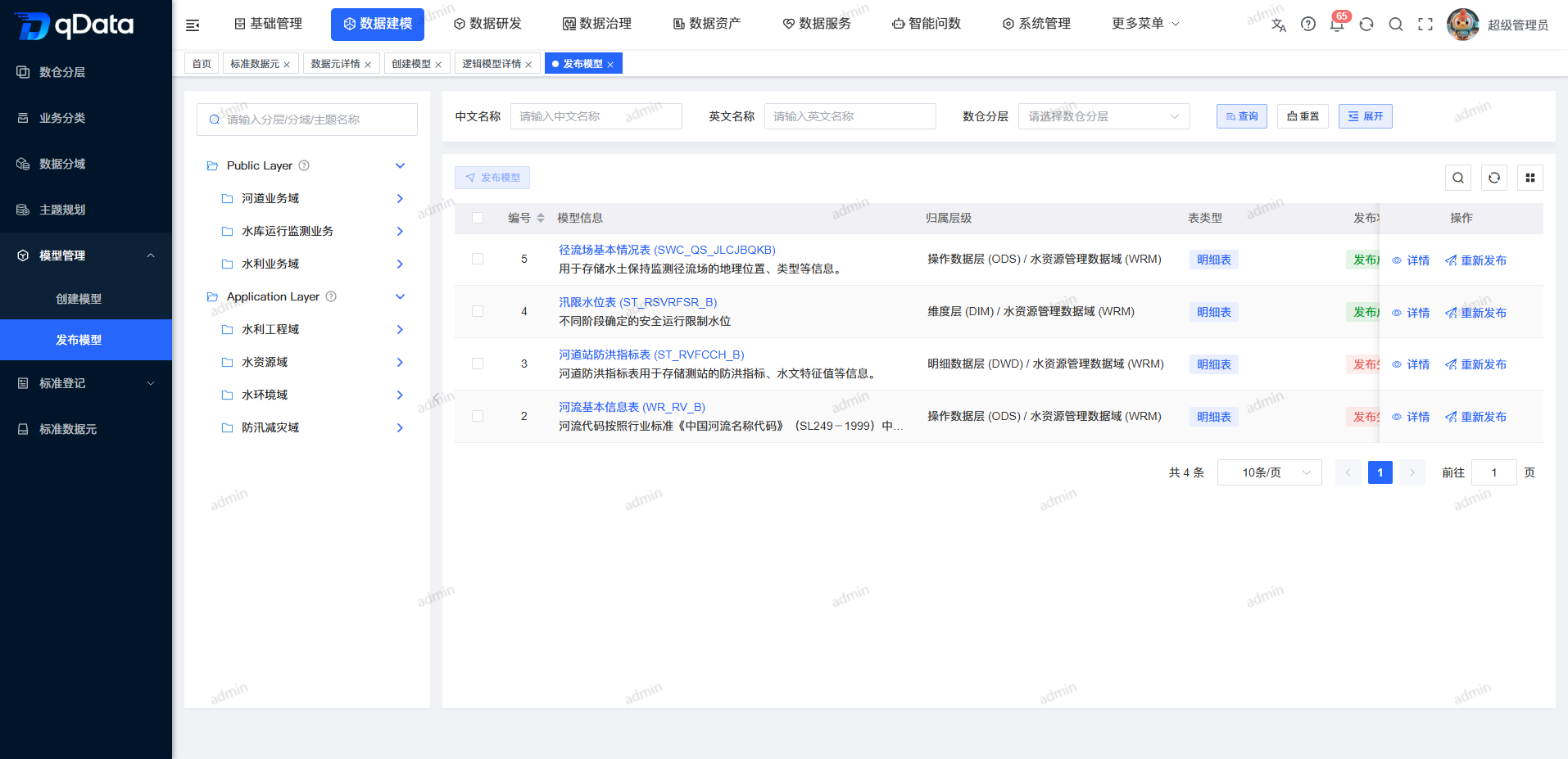
The page provides classification tree, model query area, publishing status list and publishing operation. Unreleased models display [Published], and models with published records display [Republished].
Recommended operating procedures
First release: Locate the unreleased model -> Click [Publish] -> Select database connection -> Select release mode -> Check the confirmation prompt -> Confirm execution -> View list release status.
Re-publish: Locate the model with existing release records -> Click [Re-publish] -> Recheck the connection and mode -> Confirm execution -> View the latest release status.
Functional operation instructions
Query publishing model
- Select the target node in the classification tree on the left.
- Enter the model query conditions.
- If you want to display more query conditions, click [Expand].
- Click [Query].
- Check the model ownership level, table type and release status.
- Click [Reset] to restore the default list.
- If you need to check the model information, click [Details].
First release model
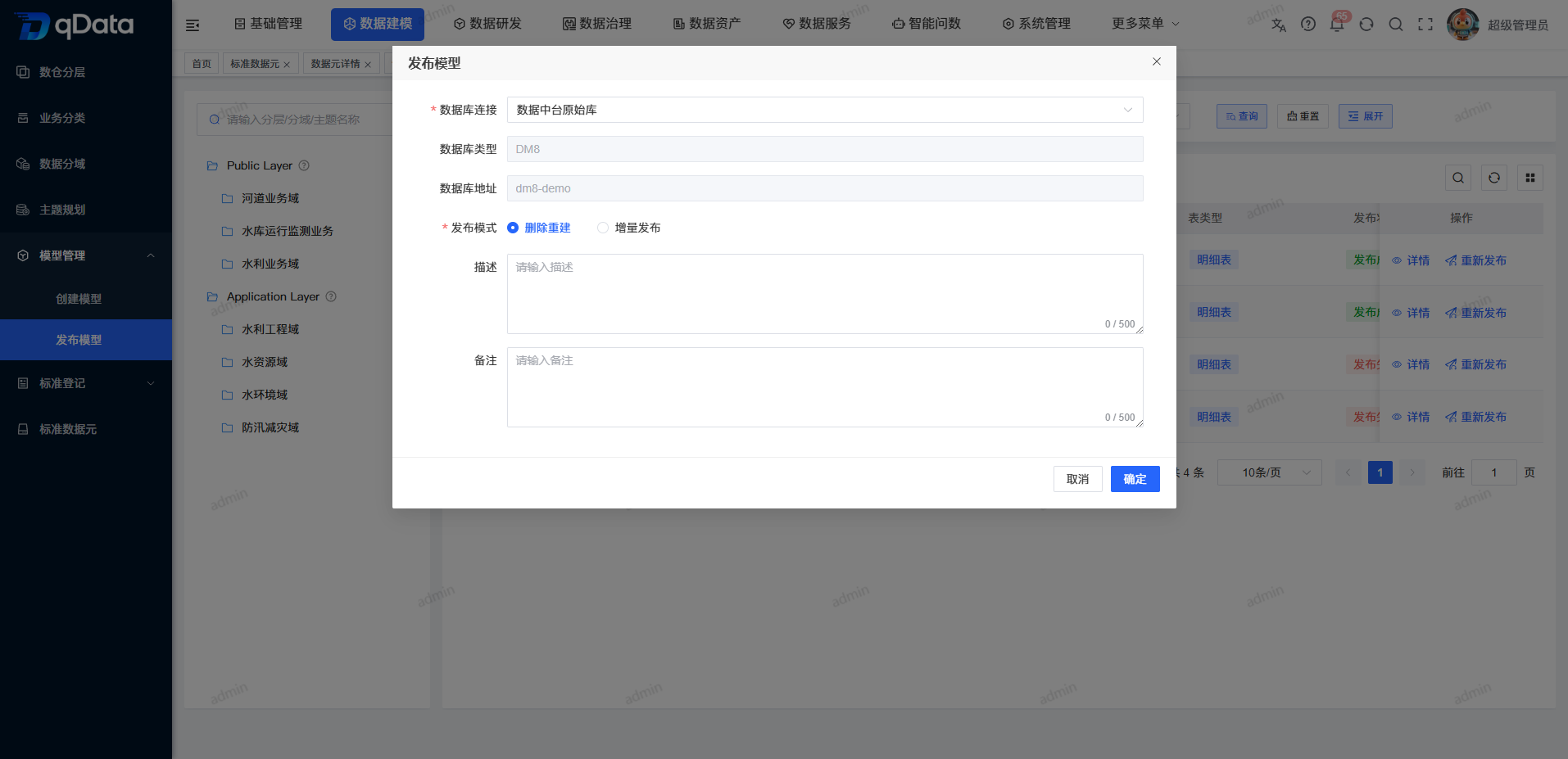
- Click [Publish] in the unpublished model row.
- Select a database connection.
- Check the database type and database address brought out by the system.
- Select a publishing mode.
- Fill in the description and notes as needed.
| Field Name | Description | Required or not |
|---|---|---|
| Database Connection | Select the target connection for model publishing. | Yes |
| Database type | Select the connection and be brought out by the system. | No (brought out by the system) |
| Database address | Select the connection and be brought out by the system. | No (brought out by the system) |
| Release Mode | Select Delete Rebuild or Incremental Release. | Yes |
| Description | Fill in the release notes. | No |
| Remarks | Fill in the supplementary information. | No |
- Expand the "Database Connection" drop-down box.
- Select the target connection.
- Click [Confirm].
- Check the secondary confirmation prompt according to the selected publishing mode.
Use delete rebuild mode
- Select Delete Rebuild in release mode.
- Click [Confirm].
- Read the irreversible prompt displayed by the system.
- Check the prompts for the impact of clearing the original table data and re-creating the physical table structure.
- When confirming to continue, click [OK] in the confirmation prompt.
- If you do not want to continue, click [Cancel].
Use incremental release mode
- Select "Incremental Release" in release mode.
- Click [Confirm].
- Read the prompt displayed by the system to retain the original table data.
- Check that this change only adds descriptions of new field columns.
- Click [OK] in the confirmation prompt to execute publishing.
View publishing results
- Return to the model list after publishing is completed.
- Position the model you just worked on.
- Check the release status of the model.
The list distinguishes between unpublished, successfully published, and failed publishing. The current material does not show the reasons for publishing failure, and this page does not extend the failure handling rules.
Republish model
- Click [Republish] in the model row that has published records.
- Verify the model and publication information in the republish form.
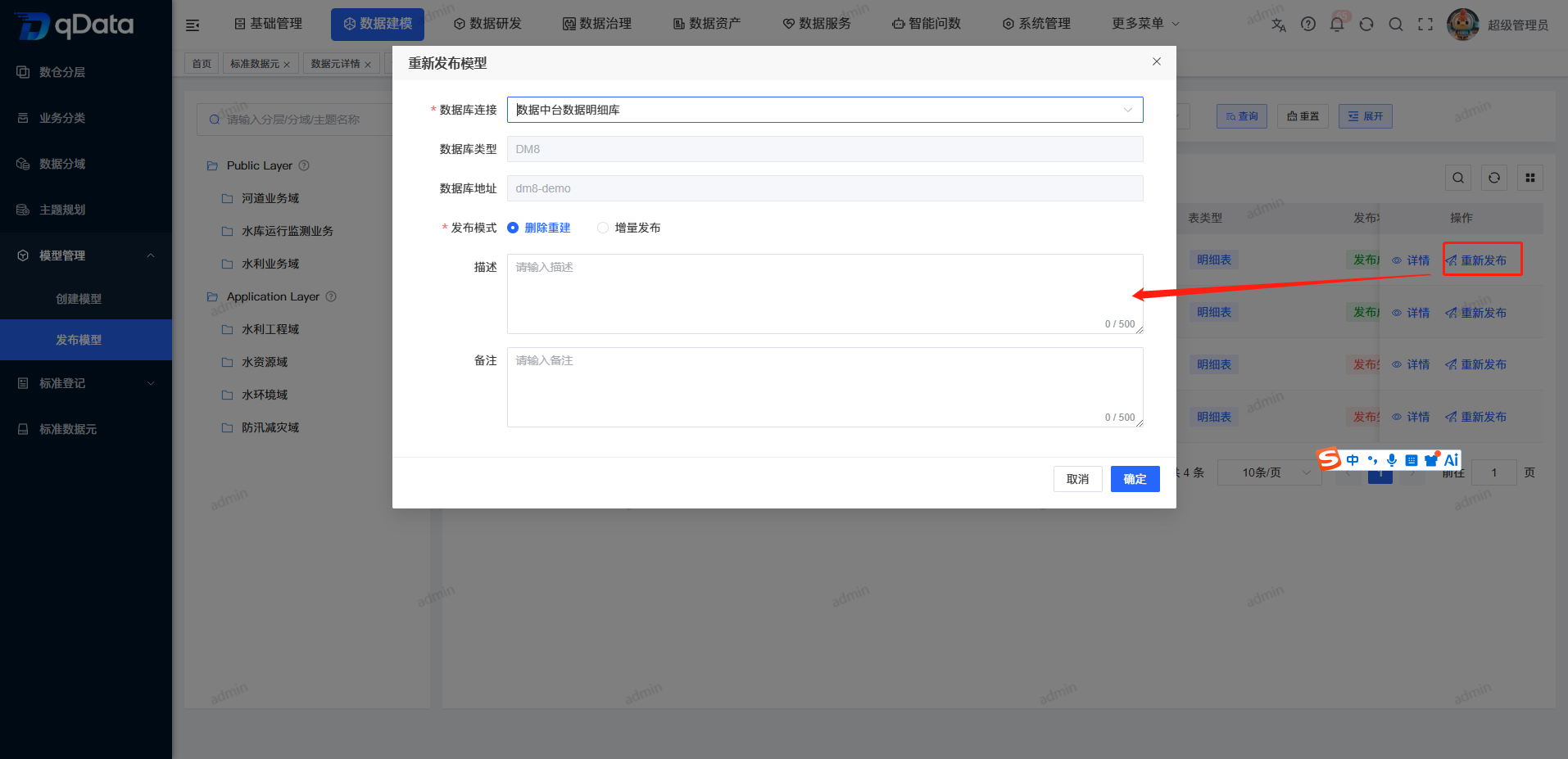
- Re-select or check the database connection.
- Select Delete Rebuild or Incremental Release mode.
- Fill in the description and notes as needed.
- Click [Confirm].
- Complete the secondary confirmation of the selected release mode.
- Return to the list to check the latest release status.
FAQ
What is the difference between delete rebuild and incremental release?
deletion and reconstruction will clear the original table data and re-create the physical table structure; incremental publishing retains the original table data and only adds new fields and columns.Why does the model list show [Republished]?
This model has a release record. After the model structure is changed, you can select the database connection and publishing mode again through [Republish].
Summarize
The publish model page is used to synchronize the logical model structure to the target database. Before execution, please focus on checking the target model, database connection, release mode and secondary confirmation prompt . In particular, use deletion and reconstruction with caution.