
Theme planning
Feature overview
Functional positioning
Topic planning is used to organize business topics in a tree hierarchy, and maintain English abbreviations, data warehouse hierarchies, responsible persons and status for each topic, which facilitates subsequent logical model positioning and management by topic.
Simple understanding: Classify the model hierarchically according to business themes, and at the same time clarify which data warehouse level each theme belongs to and who is responsible for it.
Usage suggestions
First maintain the available data warehouse hierarchy, and then determine whether the new topic should be a top-level topic or a subordinate topic of a parent topic; after the operation, check the ownership and status by expanding the hierarchy.
Main features
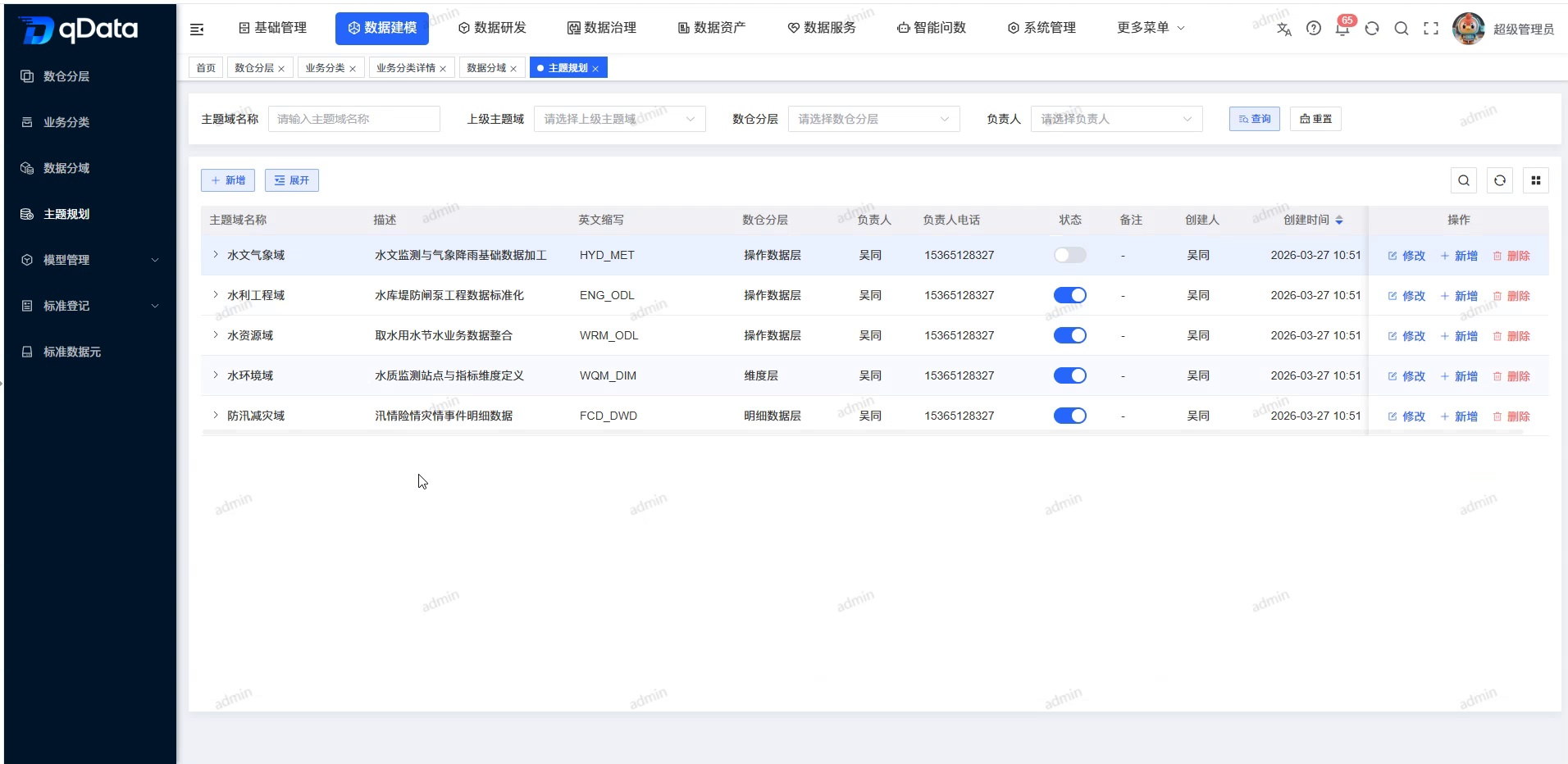
- Tree Topic: Displays the topic hierarchy with parent topics and subordinate topics.
- Conditional query: Locate records hierarchically by subject domain name, superior subject domain and data warehouse.
- Theme Maintenance: Provides entrances for adding top-level topics, adding lower-level topics within the row, modifying and deleting.
- Status Management: The list displays the enabled or disabled status of the theme through the status switch.
Scope
This page is intended for data architects, theme planning administrators, and logical model designers. The page covers topic-level browsing, query, new addition, modification, status and deletion entries.
Preliminary steps
Preconditions
- Logged in to the qData platform.
- You have entered the [Data Modeling] module.
- The data warehouse hierarchy has been maintained.
- The topic level and English abbreviation have been clarified.
- The person in charge data can be selected normally on the page.
Navigation path
Data Modeling > Theme Planning
Page overview
The top of the page provides the subject domain name, superior subject domain and data warehouse hierarchical query, as well as the [Query] [Reset] [Expand] entrance. [New] and [Expand] are provided above the list. The list displays the subject domain name, description, English abbreviation, data warehouse hierarchy, person in charge, phone number of the person in charge, status and row operations in a tree structure.
Recommended operating procedures
Typical scenario: Query or expand the topic level -> Select the parent topic -> Maintain the topic by adding or modifying the entry -> Return to the list to check the level and status.
Troubleshooting: Click [Reset] to clear filter conditions -> Click [Expand] to view the complete level -> Check the upper-level subject area and data warehouse hierarchy -> Checklist status.
Functional operation instructions
Query topic
- Fill in the name or keyword in the "Subject Domain Name" input box.
- Select the upper-level subject area as needed.
- Select the data warehouse layer as needed.
- Click [Query].
- View eligible topics.
- When you need to restore the default results, click [Reset].
View topic level and status
- Click [Expand] on the page to view all levels.
- When you need to view a single parent topic, click the expand icon in front of the row.
- View the child topics under the parent topic.
- Check the English abbreviation and data warehouse hierarchy of the subtopics.
- Check the owner and status of the subtopic.
Add topic
- When you need to create a top-level theme, click [Add] at the top of the page.
- When you need to create a subordinate topic, click [Add] in the target parent topic line.
- Check the "Superior Subject Field" in the actual form.
- Maintain subject information per official PRD.
| Field Name | Description | Required or not |
|---|---|---|
| Parent topic field | Select the parent node of the current topic; if not selected, it indicates the top-level topic. | No |
| Subject field name | Fill in the Chinese name of the subject. | Yes |
| English abbreviation | Fill in the English identification of the subject. | Yes |
| Data warehouse layer | Select the data warehouse level corresponding to the theme. | Yes |
| Responsible Person | Select the person responsible for the topic. | Yes |
| Person in charge’s phone number | After selecting the person in charge, the system will bring out the contact number. | No (brought out by the system) |
| Status | Set enabled or disabled. | Yes |
| Description | Fill in the theme purpose description. | No |
| Remarks | Fill in the supplementary instructions. | No |
- Press the actual form button to submit or cancel the action.
Modify theme
- Locate the target topic in the list.
- Click [Modify].
- Check the superior subject field and data warehouse hierarchy in the actual form.
- Adjust the fields as needed and submit or cancel using the page's current buttons.
The current screen recording only confirms the [Modify] entry, and does not display the modification form and submission results.
Maintain topic status
- Locate the target topic in the list.
- Check the status switch and current status.
- If you need to change the status, press the current interactive operation on the page.
The current screen recording shows the status switch and the existing enabled status, but does not demonstrate the prompts or results after the switch.
Delete topic
- Locate the target topic in the list.
- Click [Delete].
- Continue according to the current prompts on the page.
- Check the topic hierarchy after returning to the list.
Operation tips
Deleting a parent topic may affect child topics and associated models. Before execution, you should check the topic level, data warehouse layering and model usage.
FAQ
- **What are the consequences of incorrect selection of data warehouse tiers?**The data warehouse layering of the
theme is used to organize the model. Incorrect selections will result in inaccurate model attribution and retrieval and should be checked before submission.
Summarize
The theme planning page is used to establish theme hierarchies and associate data warehouse hierarchies. During maintenance, you should focus on checking the upper-level subject domain, English abbreviation, data warehouse hierarchy and status to ensure that subsequent logical models can be correctly classified.