
Industry Standard
Feature overview
Functional positioning
Industry Standards is used to centrally register and review industry-level standard materials, maintain standard categories, numbers, names, status, dates, descriptions and original documents, and provide industry standard basis for standard retrieval, logical models and standard data elements.
Simple understanding: stores the basic information and original documents of industry standards on one page to facilitate query, maintenance and review.
Usage suggestions
Before maintaining a standard, confirm the category, standard number and standard name; when uploading or replacing a file, check whether the file content is consistent with the current standard record.
Main features
- Classification Query: Locate industry standards by standard category, standard number, standard name and standard status.
- Data Maintenance: Add or modify standard basic information, life cycle dates, descriptions, notes and files.
- File Operation: Enter the [Preview] [Download] [Delete] entrance through the [More] menu.
- View details: Enter the complete information page of the target industry standard from the list.
Scope
This page covers industry standard query, list, addition, modification, details and standard document entry. It does not include industry standard formulation or approval process. Modification results, download results and deletion confirmation are subject to the actual feedback on the page.
Document verification
Inconsistencies in standard numbers, standard names and documents can cause incorrect references. Before modifying or using a file, you should first check the current list record and file information, and confirm that the [More] menu is acting on the target line.
Preliminary steps
Preconditions
- Log in to the qData platform and have access to the [Industry Standard] menu.
- Industry standard categories have been maintained and can be selected normally.
- When maintaining files, the standard files to be uploaded or replaced are ready.
Navigation path
Data Modeling > Data Standards > Industry Standards
Page overview
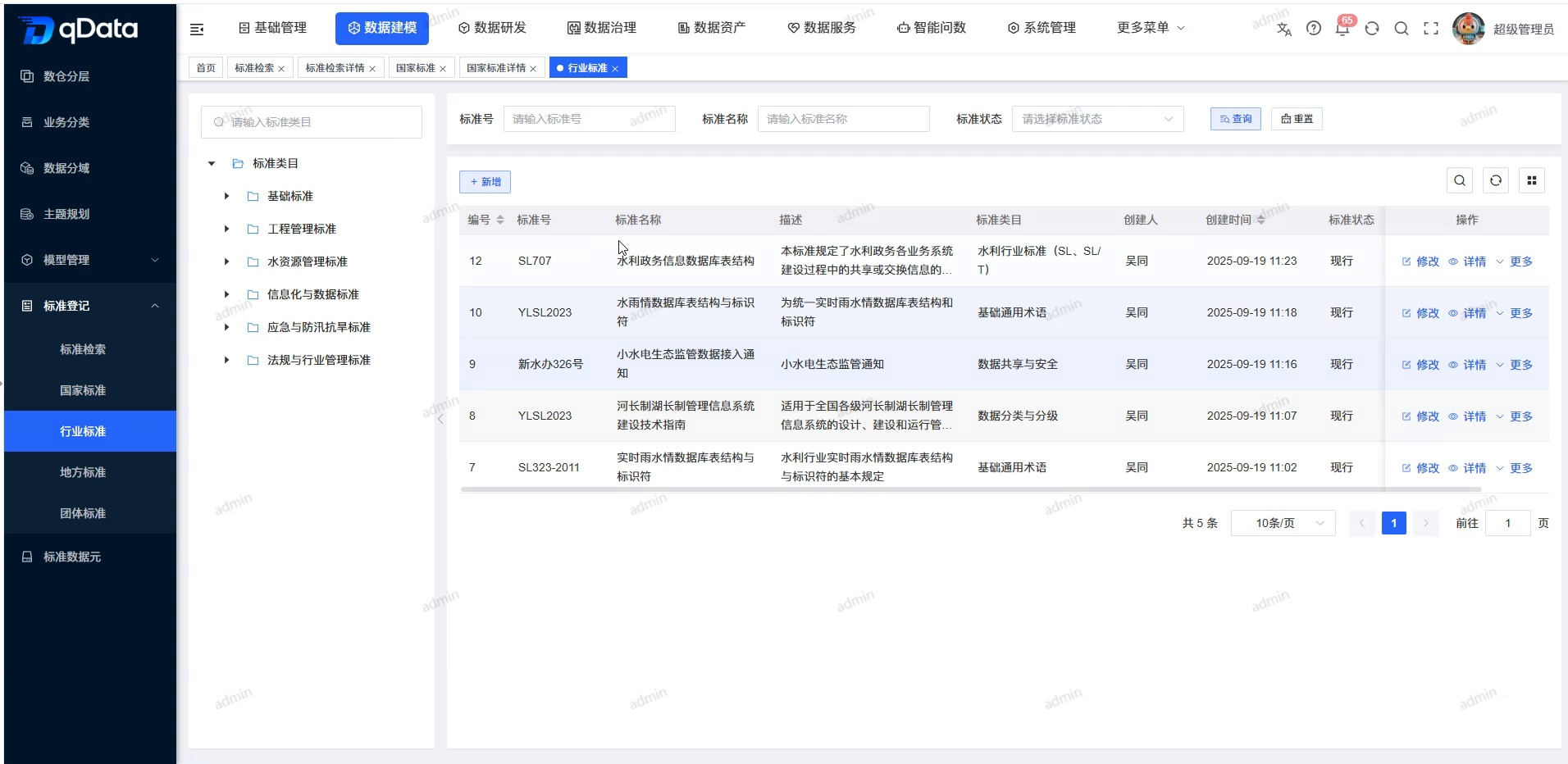
The standard category search box and category tree are displayed on the left side of the page, and the standard number, standard name, and standard status query conditions are provided on the right side, as well as [Query], [Reset], [New], industry standards list, row operations, and paging. The standard name, description, category, standard number, status and creation information can be viewed in the list.
Recommended operating procedures
Data maintenance: Select standard category -> Query or locate records -> Click [Add] or [Modify] -> Fill in and check the standard information and current file -> Click [OK] -> Return to the list to check records.
File review: Positioning target record -> Click [More] -> Select [Preview] or [Download] -> Check whether the operation object is the current standard.
Functional operation instructions
Browse and query industry standards
- Select the target category in the standard category tree on the left.
- Enter the standard number as required.
- Enter a fully qualified name if required.
- Select the standard status as required.
- Click [Query].
- View eligible industry standard records.
- Click [Reset] to restore the default conditions and lists.
Add or modify industry standards
- Click [Add] when adding a new record.
- Click [Modify] on the target row when modifying the record.
- Fill in or adjust industry standard information.
| Field Name | Description | Required or not |
|---|---|---|
| Standard Category | Select the category to which the industry standard belongs. | Yes |
| Standard Status | Select the current status of the standard. | Yes |
| Standard number | Fill in the industry standard number. | Yes |
| Standard name | Fill in the industry standard name. | Yes |
| File | Select or replace the standard original text; you can view the current file when modifying. | Yes |
| Issuing organization name | Fill in the standard issuing organization. | No |
| Version number | Fill in the version ID. | No |
| Release Date | Select a release date. | No |
| Implementation Date | Select an implementation date. | No |
| Retirement Date | Select a revocation date. | No |
| Description | Fill in a standard summary, up to 500 characters. | No |
| Remarks | Fill in the supplementary explanation, up to 500 characters. | No |
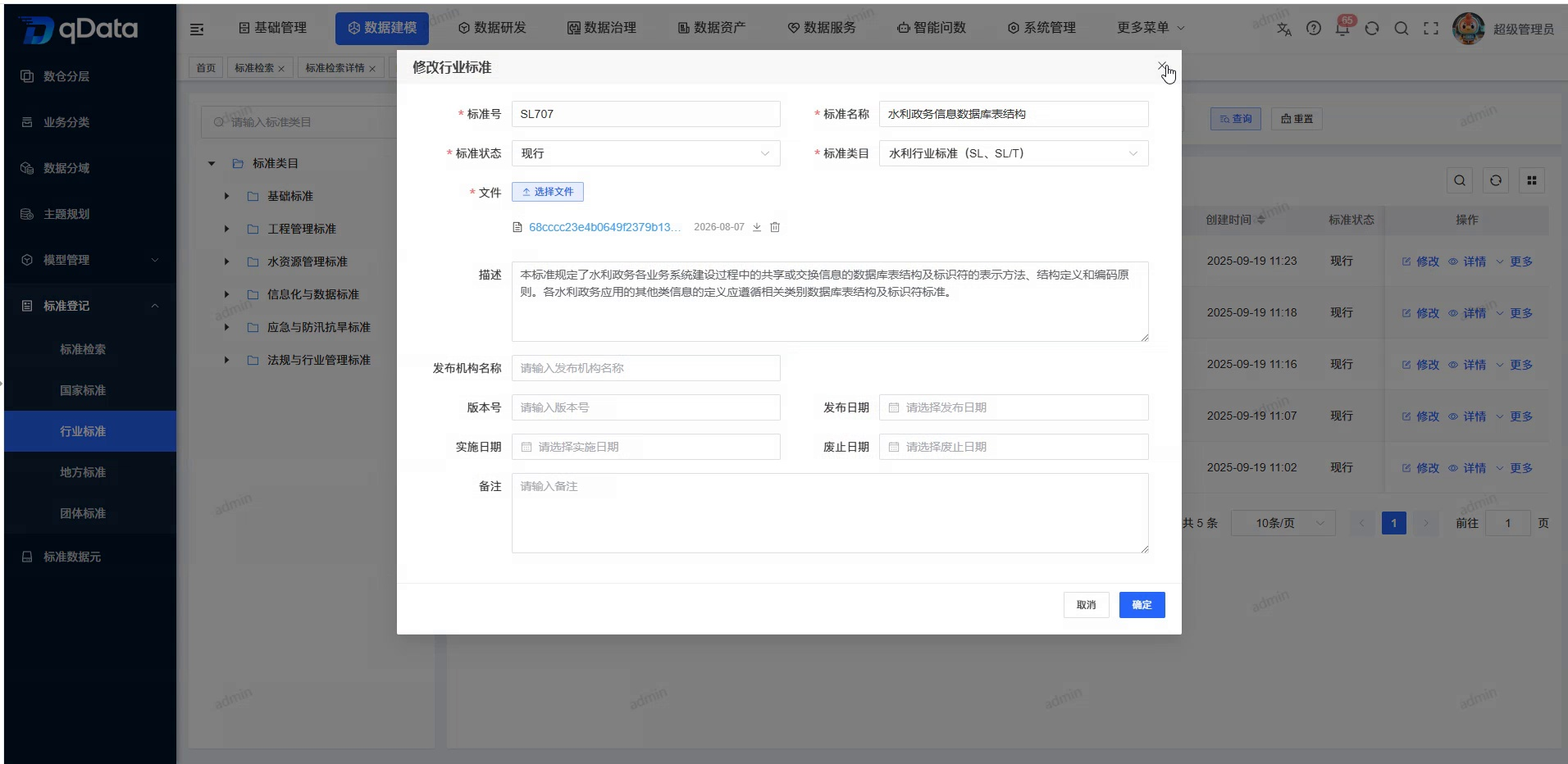
- When modifying, check the original record and the current file brought out by the form.
- Click [OK] when you need to submit.
- Click [Cancel] if not saving.
- Return to the list to query the target record and check the latest information.
View industry standards details
- Click [Details] in the target record row.
- Check the standard number, standard name, category and status.
- View the file, publishing authority, version, and lifecycle date.
- Return to the industry standards list.
Use the download or delete portal
- Click [More] in the target record row.
- Click [Download] when downloading the file.
- Click [Delete] when deleting a record.
- Check the industry standard records corresponding to the current operation.
- Continue processing according to the actual confirmation and result prompts on the page.
Summarize
The industry standards page is used to query, maintain and review industry standard materials. When operating, please focus on checking the standard category, standard number, standard name, status and original file , and ensure that the file operation always corresponds to the current record.