
Data Quality Category
Feature overview
Functional positioning
Data Quality Categoriesare used to establish a tree classification structure for data quality work to help users organize and position the categories used for data quality tasks by business topic. Portals for category queries, hierarchical browsing, additions, modifications, status controls, and deletions are provided in the page set.
Simple to understand: The data quality category is equivalent to the taxonomy of the data quality task; the parent category and hierarchy are maintained before being referenced by the data quality task. Classes used by existing tasks cannot be directly disabled.
Usage suggestions
It is recommended to query and locate the category by __ PH_->0 __ to confirm the parent-child hierarchy -> Add or modify the -> check task reference -> adjustment status or delete . Before adjusting the status and deletion, confirm whether the target category and its subtree are still used.
Main features
- Tree classification: Display parent categories, subcategories and their hierarchical relationships through node arrows and indentations.
- Conditional positioning: Supports searching for records by data quality category name and superior category.
- Category Maintenance: Provides entrances for top-level addition, in-line addition, modification, single item deletion and batch deletion.
Scope
This page is used to maintain the data quality classification structure, do not configure specific data quality tasks here. Enable categories to be displayed and selected in other reference locations; after the category is successfully disabled, it is only removed from the visible, selectable range of other reference locations, does not delete the category and existing historical data, and does not cascade to change the status of parent and child nodes or other objects.
Preliminary steps
Preconditions
- You have logged in to the qData platform and can access the [Basic Management] module.
- Identified the data quality categories that need to be maintained and their parent-child hierarchies.
- To disable categories, check if there is a data quality task for the target category.
- To delete a parent category, all of its descendants and related references have been evaluated.
Navigation path
Basic management > Category management > Data quality category
Page overview
After entering the [Data Quality Category], provide the "Data Quality Category Name" "Parent Category", [Query] and [Reset] at the top of the page; the toolbar provides [New] [Delete] [Expand]. The list shows the data quality category name, description, status, sorting, notes, creator, creation time, and action entry in a tree structure.
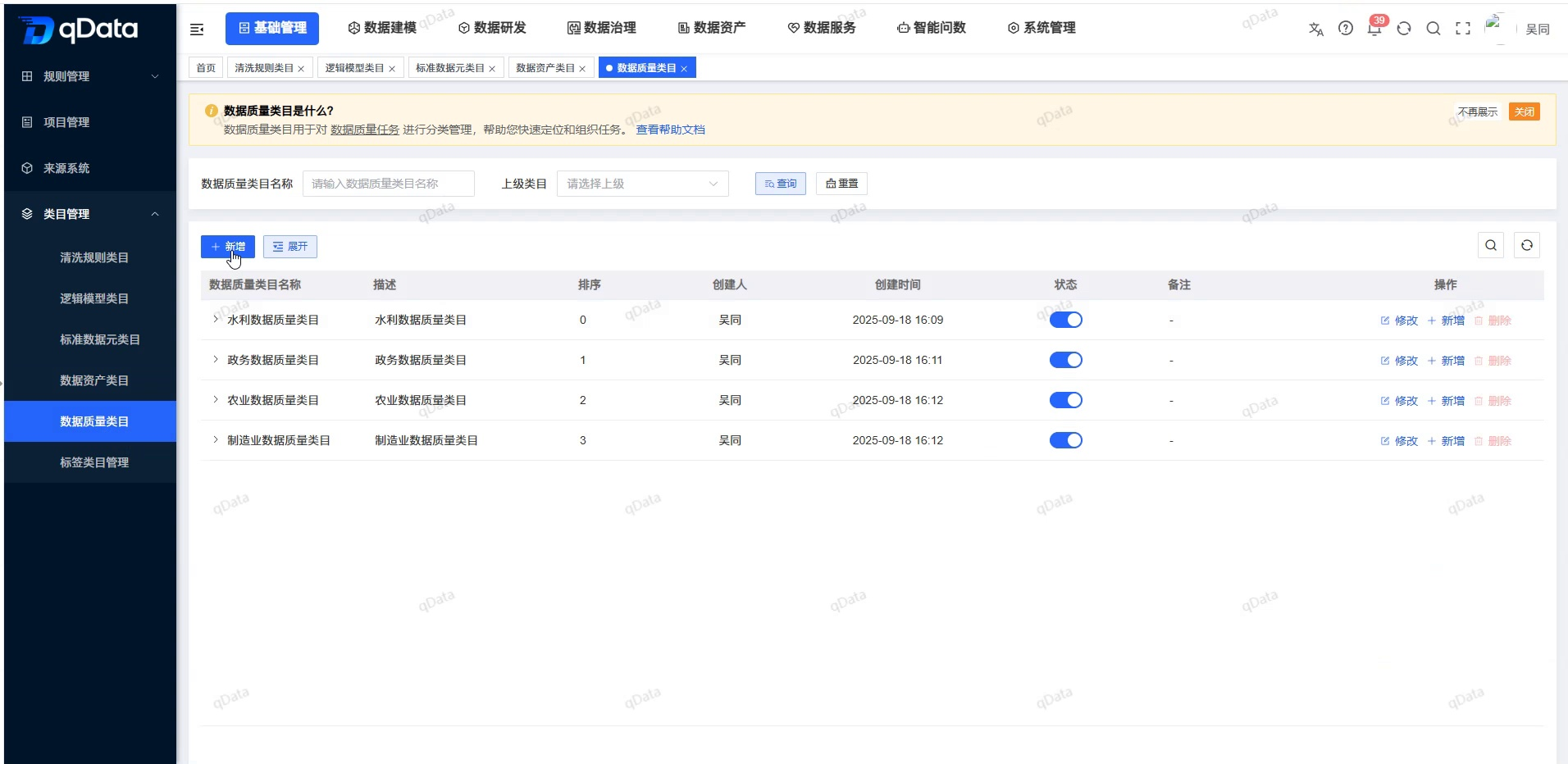
Recommended operating procedures
Daily Query: Enter a category name or select a parent category -> Click [Query] to -> expand the target node -> check status, sorting, and parent-child hierarchy.
Category Maintenance: Locate the target parent category -> Click [Add] or [Modify] in the row to -> check the parent category -> Fill in the name, status, sorting and description -> Click [OK] to initiate the submission.
Status Adjustment: First check the data quality task reference -> Click the status switch to -> check the second confirmation Confirm whether the status has changed -> according to the system feedback.
Deletion process: Confirm that the target and full subtree are no longer used -> Click [Delete] in the row or use the toolbar [Delete->] after checking and double-checking -> Careful decision to proceed.
Functional operation instructions
Query data quality category
- Enter the name keyword in the Data Quality Category Name.
- Select Parent Category as needed.
- Click [Query] to view the matching records.
- To reset the conditions, click [Reset].
The name query uses fuzzy matching; after selecting the parent category, the query results include the descendant category of the selected node. The lower the sort value, the higher the record; the order is not fixed when the sort values are the same.
View category hierarchy
- Locate the parent category with children in the list.
- Click the expand arrow in front of the node.
- View the indented subcategories displayed under the parent category.
- Use the toolbar Expand to adjust the tree display as needed.
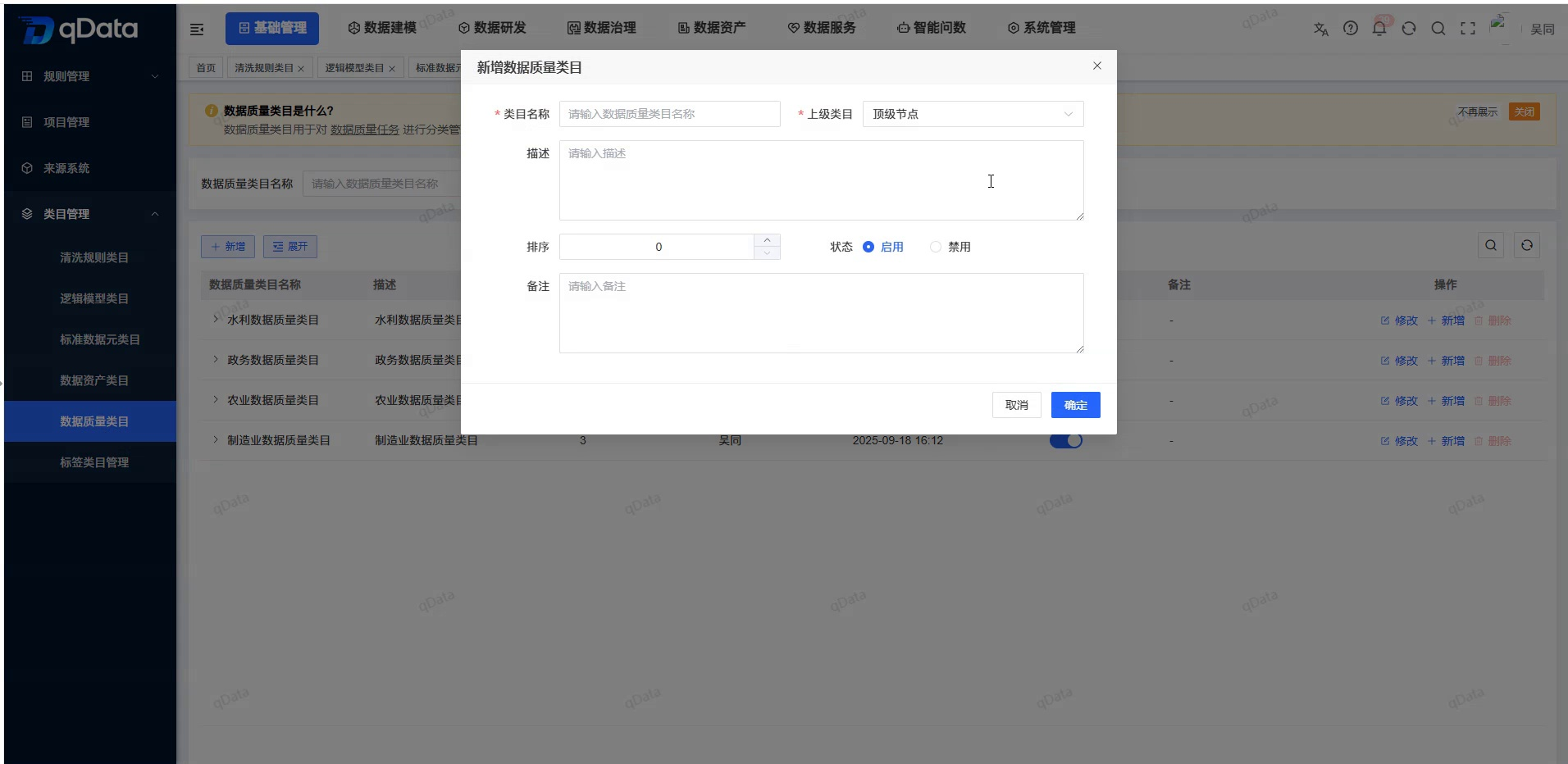
Add Data Quality Category
The toolbar [New] is used to enter the new entry of the top-level category; the [New] of the target row is used to add subcategories under the current node. When new items are added in the row, the system will automatically backfill the current node to the parent category.
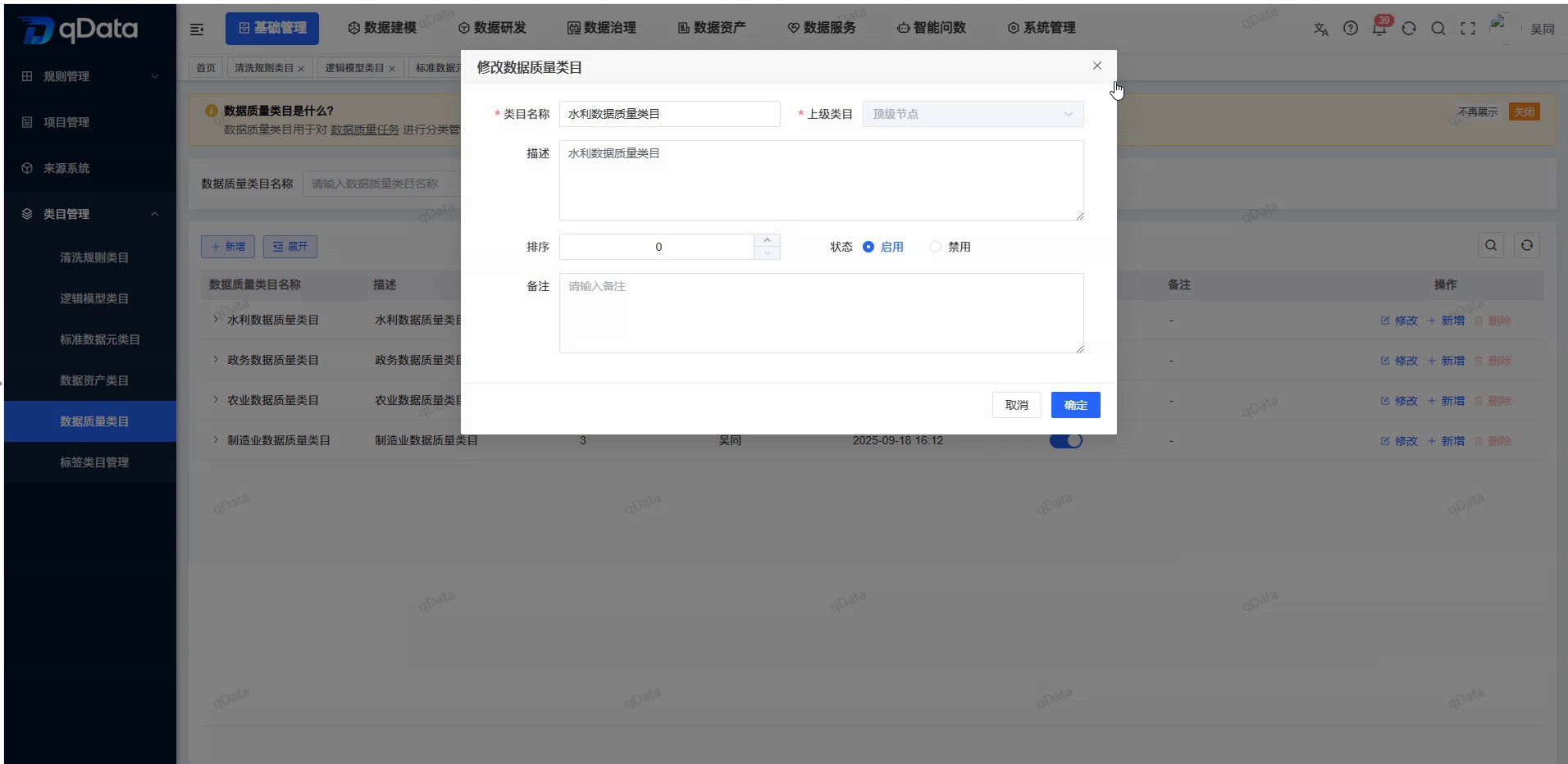
Modify Data Quality Category
- Click [Modify] in the target category row.
- Check the parent category, name, status, sorting, description and notes of the pop-up backfill.
- Adjust the fields as needed.
- Click [OK] to initiate the submission, or [Cancel] to exit.
In the modified example of "Water Resources Scheduling", the parent category is backfilled with "Water Conservancy Data Quality Category", the status is enabled, the order is 0, and the description shows 54/500.
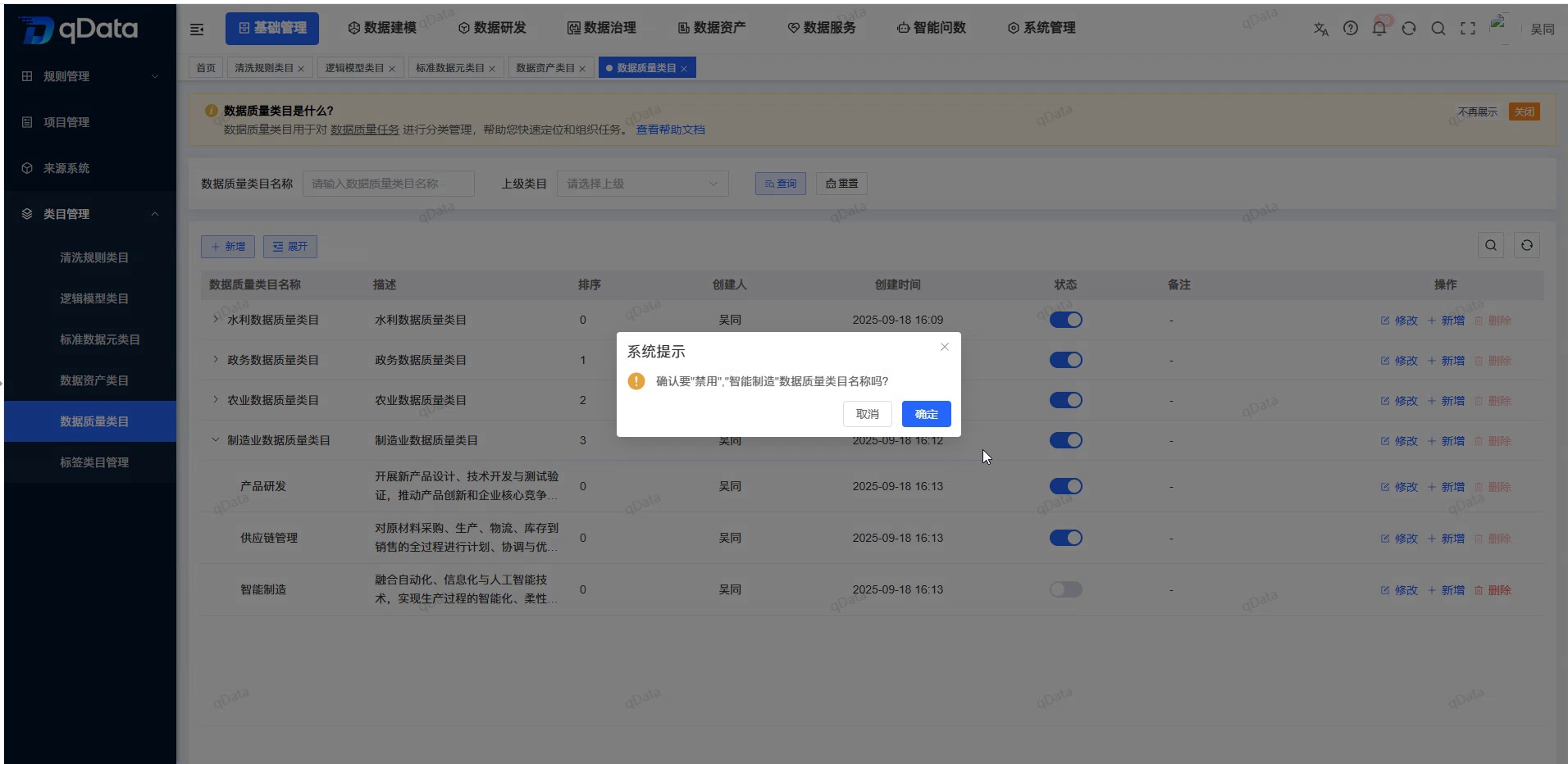
Disable categories where data quality tasks exist
- Click the status switch on the "Water Dispatch" line.
- Check the category name in the second confirmation.
- Click [OK] to try to disable.
- The system prompts "There are data quality tasks that are not allowed to be disabled".
- After returning to the list, the switch for the target category remains enabled.
Disable categories that are not blocked by tasks
- Click the status switch in the "Water Rain Monitoring" row.
- Click [OK] in the second confirmation.
- Page Prompt Disabled Successfully.
- Check that the status switch of the target category turns gray.
When successfully disabled, the category will no longer appear in the visible, selectable ranges of other referenced locations; the current category, existing historical data, parent and child nodes, and other objects will not be deleted or cascaded.
Delete data quality category
- Click [Delete] in the target category row.
- Check the object to be deleted in the second confirmation.
- If you do not want to delete it for the time being, click [Cancel] to return to the list.
- Check that the target record is still retained upon return.
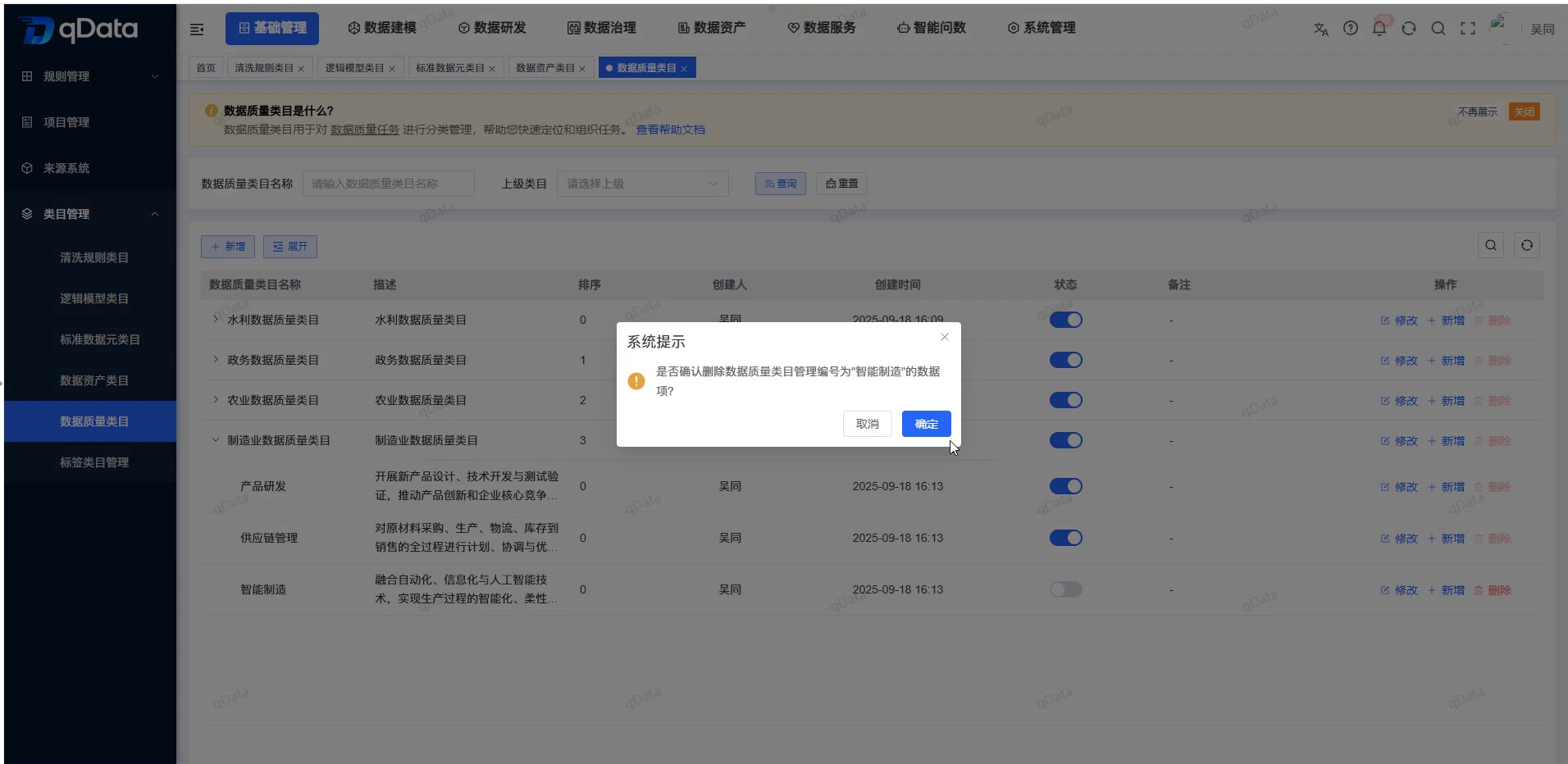
Before deletion, the system recursively checks for references to the target category and all its descendants:
- When any node has a reference, the entire deletion will not be performed, and the target category and complete subtree will be retained.
- When there is no reference to the target category or the complete subtree, deleting the parent category will cascade delete all descendant categories.
FAQ
Can category names be repeated?
OK. Names are not checked for uniqueness, and duplicate names can appear at the same level or at different levels.Can I adjust the superior category when modifying the category?
OK. The current rules do not limit target nodes, and do not perform circular mount verification. The level should be carefully checked before adjustment.**Why can't categories be deleted?**The
system will check the references of the target category and all descendant categories; when there is a reference to any node, the complete subtree will be retained.
Summarize
The key to maintaining data quality categories is to check https://qiantong.tech parent categories, sort values, status, and reference relationships at the same time. When querying, note that the name fuzzy match and parent category contain descendants; confirm the parent-child hierarchy when maintaining; focus on checking the data quality task before disabling; check the reference to the full subtree before deleting to avoid affecting the classification structure that is still in use.