
Data development category
Feature overview
Functional positioning
Data Development Category is used to maintain the data development classification tree in the current project, organize the categories through the parent-child hierarchy, and centrally view the status, sorting and creation information of the categories.
Simple understanding: organizes the data development categories of the current project into a tree. You can not only view the existing hierarchy, but also continue to maintain the categories from the top level or an existing node.
Usage suggestions
After entering the page, first confirm the [Project] at the top, and then view the category tree. To add a top-level category, use [New] on the toolbar, and to add a subcategory, use [New] on the target row; before adjusting the parent category, status, or deletion, you should first understand the hierarchy, disabling, and reference checking rules.
Main features
- Tree Display: Presents the parent-child relationship between top-level categories and sub-categories through arrows and indentation.
- Conditional query: Records can be located based on data development category names and superior categories.
- Hierarchical maintenance: Supports opening pop-up windows for top-level new additions, category modifications, and sub-level new additions.
- Status and Sorting: The list displays status switches and sorting values, and the maintenance pop-up window provides enable, disable and sort fields.
- Unified Category Rules: Name duplication, level adjustment, deletion, disabling, querying and sorting adopt confirmed category management rules.
Scope
This page explains the data development category query, tree browsing, maintenance portal, form fields and category management rules in the current project.
Preliminary steps
Preconditions
- Logged in to the qData platform.
- Select the project that needs to be viewed or maintained in [Project] at the top.
- If you need to add or adjust a category, information such as category name, superior category, status, sorting, description, and remarks have been prepared.
Navigation path
Data Development > Project Basic Management > Data Development Category
Page overview
After entering [Data Development Category], the query area displays "Data Development Category Name" and "Superior Category", and provides [Query] [Reset]; the toolbar provides [Add] [Delete] [Expand]; the tree list displays category fields, status switches, and in-line [Modify] [Add] [Delete] entries.
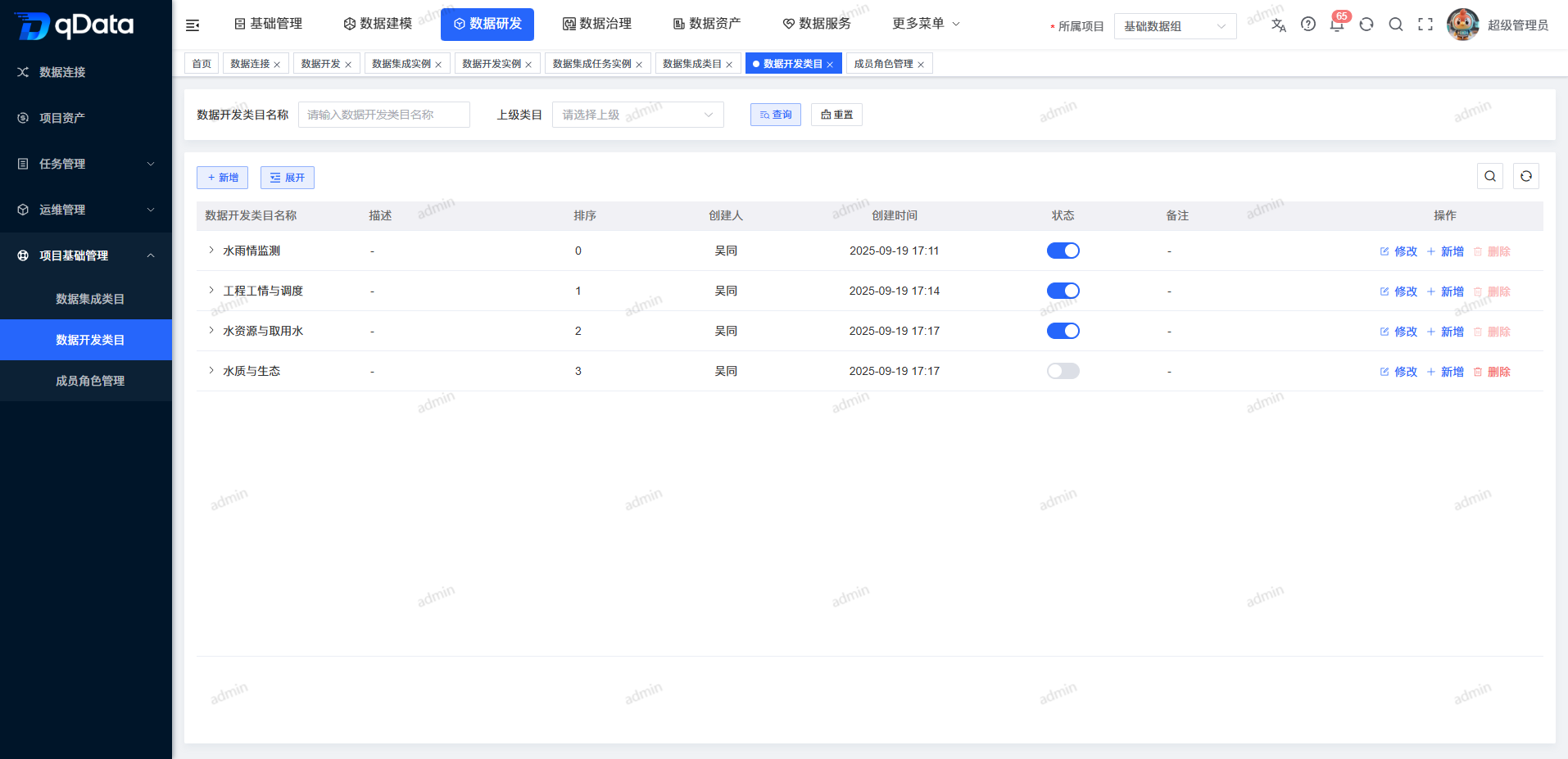
- is displayed when the description or note in the list has no value; the creator and creation time are displayed as read-only for the current record. Arrows and node indents before name columns are used to express parent-child hierarchy.
Recommended operating procedures
Daily view: Confirm the project -> Enter the data development category -> Query by conditions -> Expand the target parent node -> View category status, sorting and creation information.
View the new form: Select [New] in the toolbar or [New] in the row -> Check the superior category -> View the fields, default values and bottom buttons -> Click [Cancel] to exit.
View the modification form: Position the target category -> Click [Modify] -> Check the fields and backfill values -> Click [Cancel] to exit.
High-impact operations: Confirm the target category and subtree -> Check the reference, level or status impact -> Use delete, parent category or status entry -> Confirm the result with the actual prompt on the page.
Functional operation instructions
Query and reset categories
- Fill in the name keyword in the "Data Development Category Name" input box.
- If you want to filter by parent range, select the target node in "Parent Category".
- Click [Query] to perform filtering.
- If you need to clear the conditions, click [Reset] to restore the default query conditions.
The name condition uses fuzzy matching; after selecting the upper-level category, the result range includes the descendant categories of the selected node.
View the tree level and operation entry
- Find the parent category with an arrow in the list.
- Click the node arrow to expand the parent category.
- Look at the indented subcategories below the parent node.
- Check the status, sorting, creation information and [Modify] [Add] [Delete] entry in the target row.
The toolbar also provides the [Expand] entrance, which is used to adjust the display status of tree categories.
Open a new pop-up window for top-level categories
- Click [New] on the toolbar.
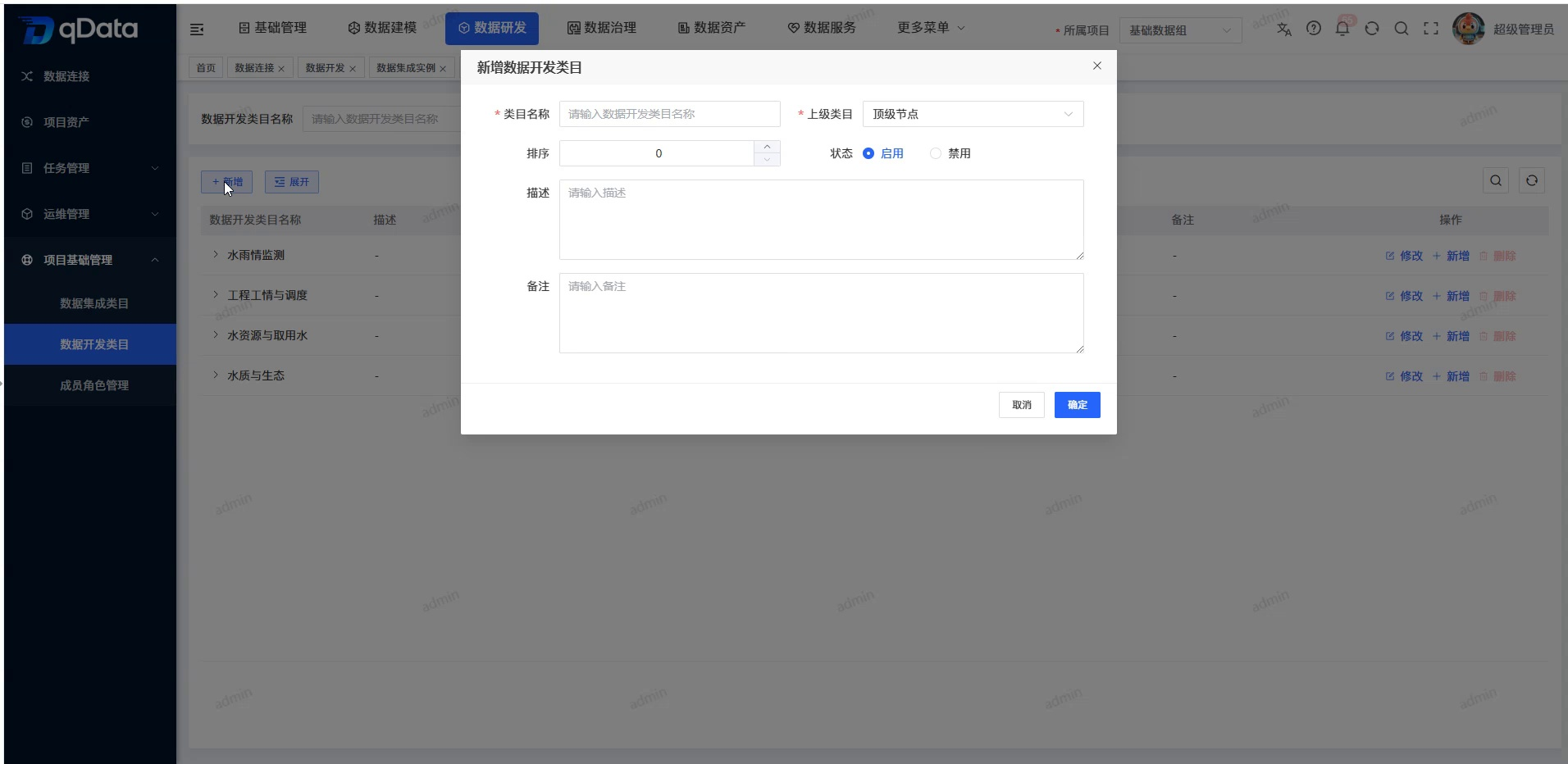
- View the pop-up window titled "Add Data Development Category".
- Check that the "Superior Category" displays "Top Node" by default.
- Check the required identification of "Data Development Category Name".
- Check fields such as status, sorting, description, and notes and their default behavior.
- Check the [Cancel] and [OK] buttons at the bottom.
- Click [OK] to submit the new addition; if you do not want to continue, click [Cancel] to exit.
Open the category modification pop-up window
- Locate the target category in the list.
- Click [Modify] on the target row.
- View the pop-up window titled "Modify Data Development Category".
- Check the current backfill values of the parent category, name, status, and sort.
- Check the description, notes and [Cancel] [OK] button at the bottom.
- Click [OK] to save the changes; if you do not want to continue, click [Cancel] to exit.
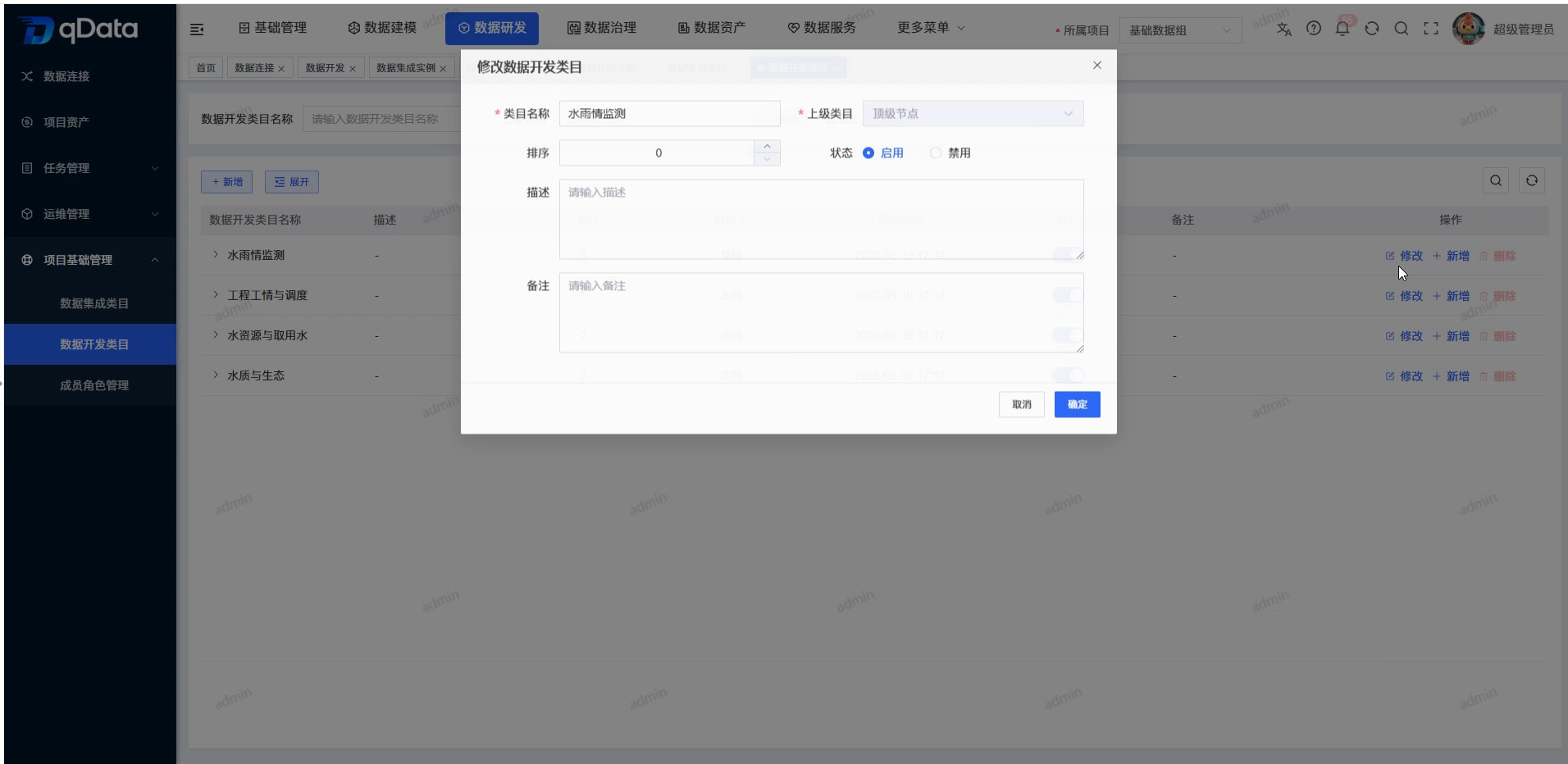
Existing categories allow adjustment of parent categories. The target hierarchical relationship should be confirmed before adjustment to avoid confusion in the category structure.
Open a new pop-up window for subcategory
- Expand the parent category that needs to be maintained.
- Click [Add] in the target node row.
- View the “Add Data Development Category” pop-up window.
- Check that the "upper category" has been backfilled with the current node that initiated the operation.
- View the subcategory name, status, sorting, description, notes and bottom buttons.
- Click [OK] to add a new subcategory; if you do not want to continue, click [Cancel] to exit.
There is no maximum level set for subcategories, and any existing category can continue to enter the process of adding new subcategories. Names are allowed to duplicate existing categories at the same or other levels.
Enable or disable categories
- Locate the target data development category in the list.
- Click the switch in the status bar.
- Confirm the enable or disable operation according to the page prompts.
- After the operation is completed, check whether the category status has been updated.
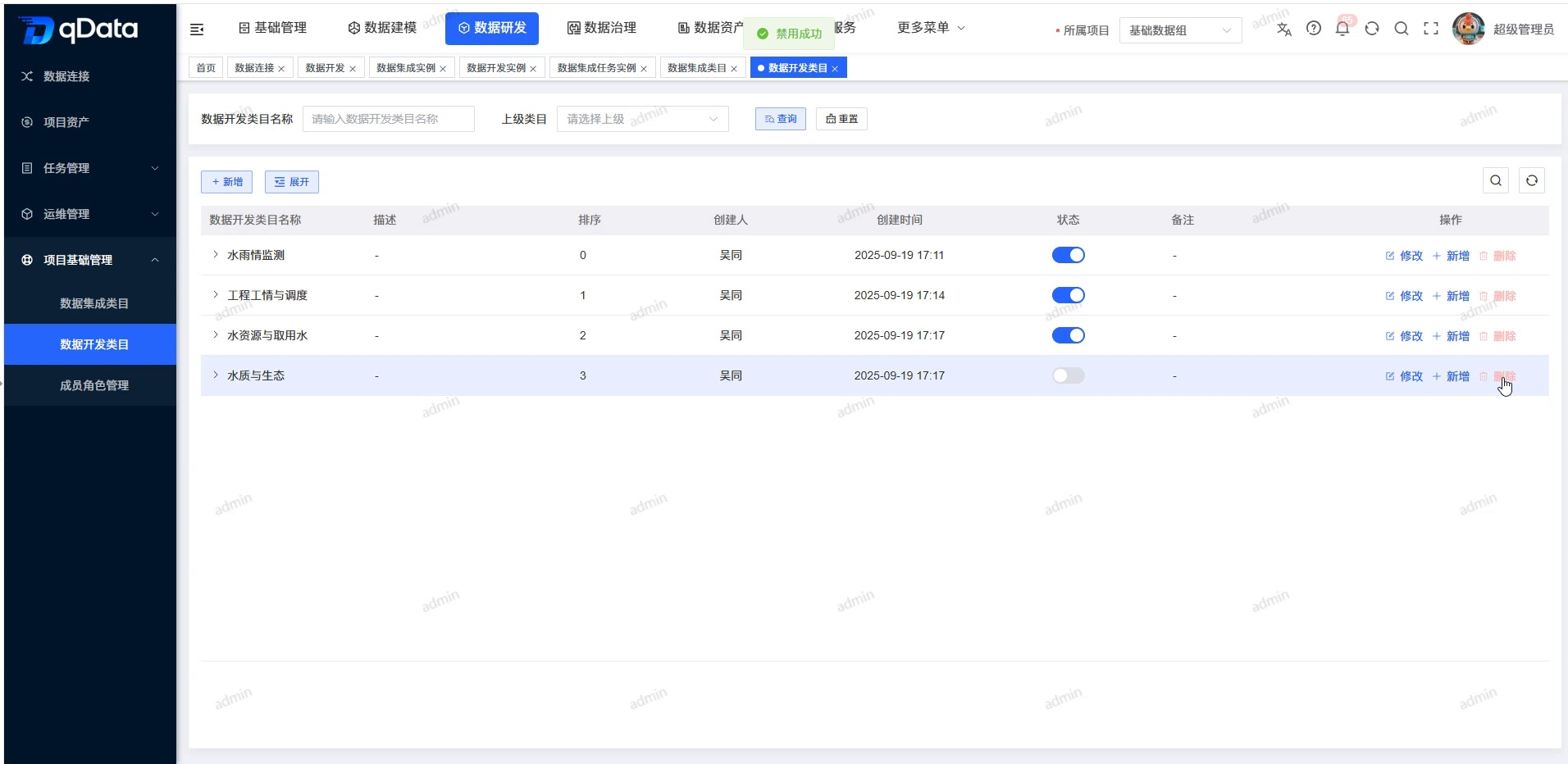
Disabling a category will not delete the current category or historical data, nor will it cascade change the status of parent-child nodes or other objects; the category will only no longer be displayed or selectable in other reference locations or pages.
Delete data development category
- Locate the data development category that needs to be deleted in the list.
- Click the [Delete] button of the target row, or use the toolbar [Delete] after checking the record.
- Verify the target category and its subtree range in the confirmation prompt.
- Click [OK] to execute the deletion.
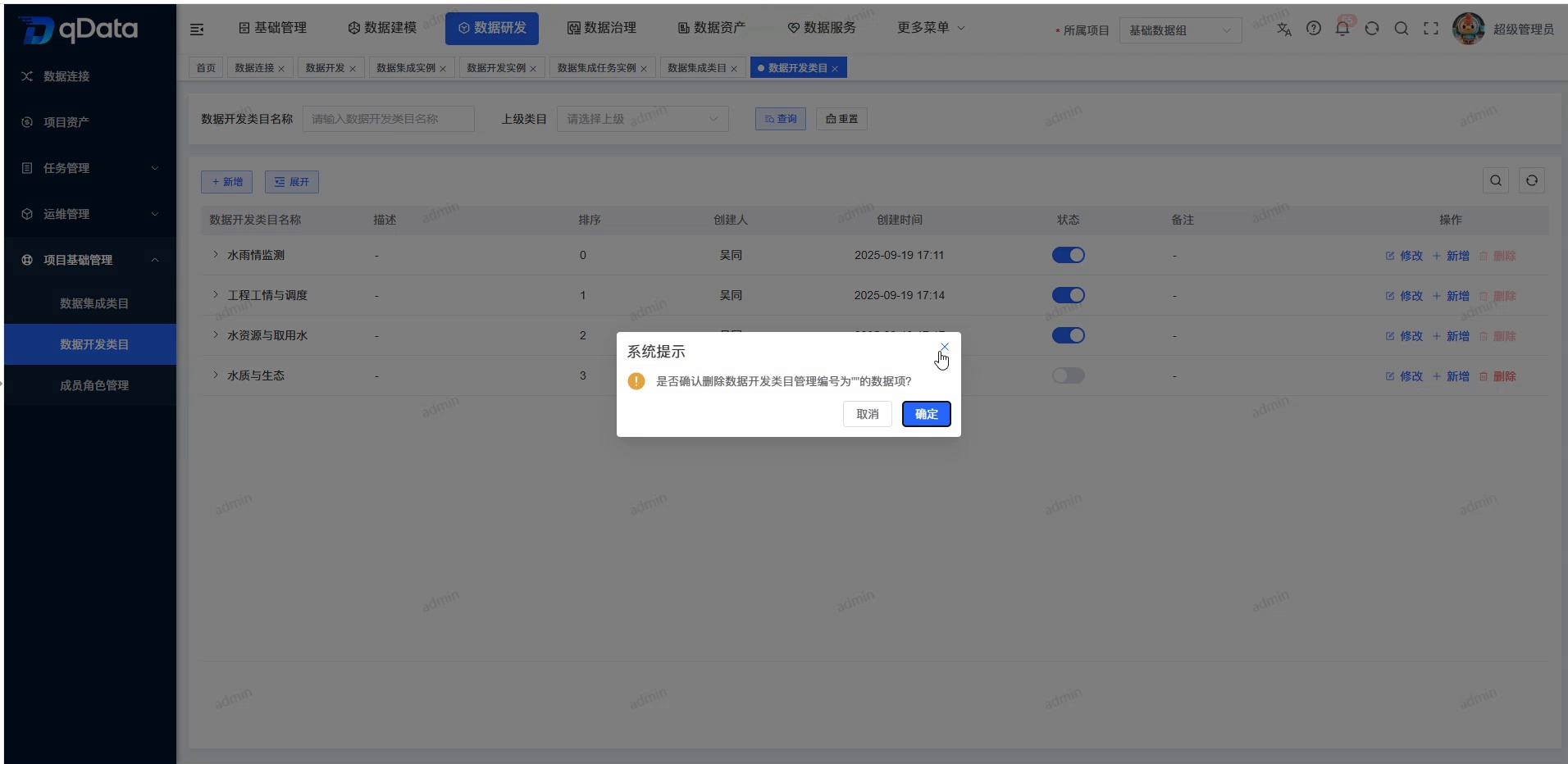
When there are no references to the target and all descendant categories, the system deletes the target category and deletes all descendant categories in a cascade. If there is a reference relationship, the related task or object reference should be released first and then deleted.
FAQ
Can the data development category name be repeated?
OK. Names are not uniquely verified, and duplication is allowed at the same level or at different levels; text normalization rules such as leading and trailing spaces are subject to actual verification by the system.Will disabling a category delete historical data or change the status of subcategories?
will not. Disabling does not delete the current category or historical data, nor does it cascade change the status of parent-child nodes or other objects; the category will only no longer be displayed or selectable in other reference locations or pages.What will happen if the parent category is deleted?
When there are no references to the target and all descendant categories, the system deletes the target category and deletes all descendant categories in a cascade.
Summarize
The data development category page is used to view and maintain the tree classification structure in the current project. During daily use, you should focus on checking the project to which belongs, parent category, hierarchical structure, status, sorting and deletion subtree range .