
Data query
Feature overview
Functional positioning
Data Query is a SQL query workspace for multiple data sources. Users can locate tables and fields from the data source tree, generate SQL from the page or manually adjust it, select the current data source to execute the query, and view the data in the result pop-up window.
Simple understanding: first find the table you want to query on the left, then confirm the data source and SQL, and finally click [Query] to view the table results.
Usage suggestions
It is recommended to follow the sequence ofConfirm data source -> Locate tables and fields -> Check SQL -> Execute query -> View results -> Export or clear as needed. SQL will not be automatically executed after switching the data source. The current data source and editor content should be rechecked before each query.
Main features
- Data source tree browsing: View queryable objects by data source, table, and field structure;
- SQL generation and editing: Select a table or field to generate a SELECT statement, and continue to adjust it in the editor;
- Multiple types of data source query: Supports connected relational databases and some big data data sources;
- Query result viewing: View dynamic columns, data rows, total number of items and paging controls in the query result pop-up window;
- Result export: Supports exporting query results to facilitate offline analysis and troubleshooting;
- SQL Clear: Supports clearing the SQL content in the editor to facilitate rewriting query statements.
Scope
This page is suitable for browsing tables and fields from the displayed data source, writing SQL, executing queries, viewing query results, exporting results, and clearing SQL. Commonly used for data analysis, problem troubleshooting, data confirmation and R&D debugging.
Preliminary steps
Preconditions
- Have logged in to the qData platform and have the relevant menu permissions for [Data Assets].
- The current user has query permissions for the target data source or table.
- The current page has loaded the available data source tree.
- The data source, table or field to be queried has been identified.
- The SQL query statements that need to be executed or adjusted have been prepared.
Navigation path
Data Assets>Data Query
Page overview
Click [Data Query] under [Data Assets] to enter the data query page. The page adopts a left-right layout: the left side displays the data source, table and field structure, the right side is used to enter or edit SQL statements, and the top provides the current data source selection and query operation entry.
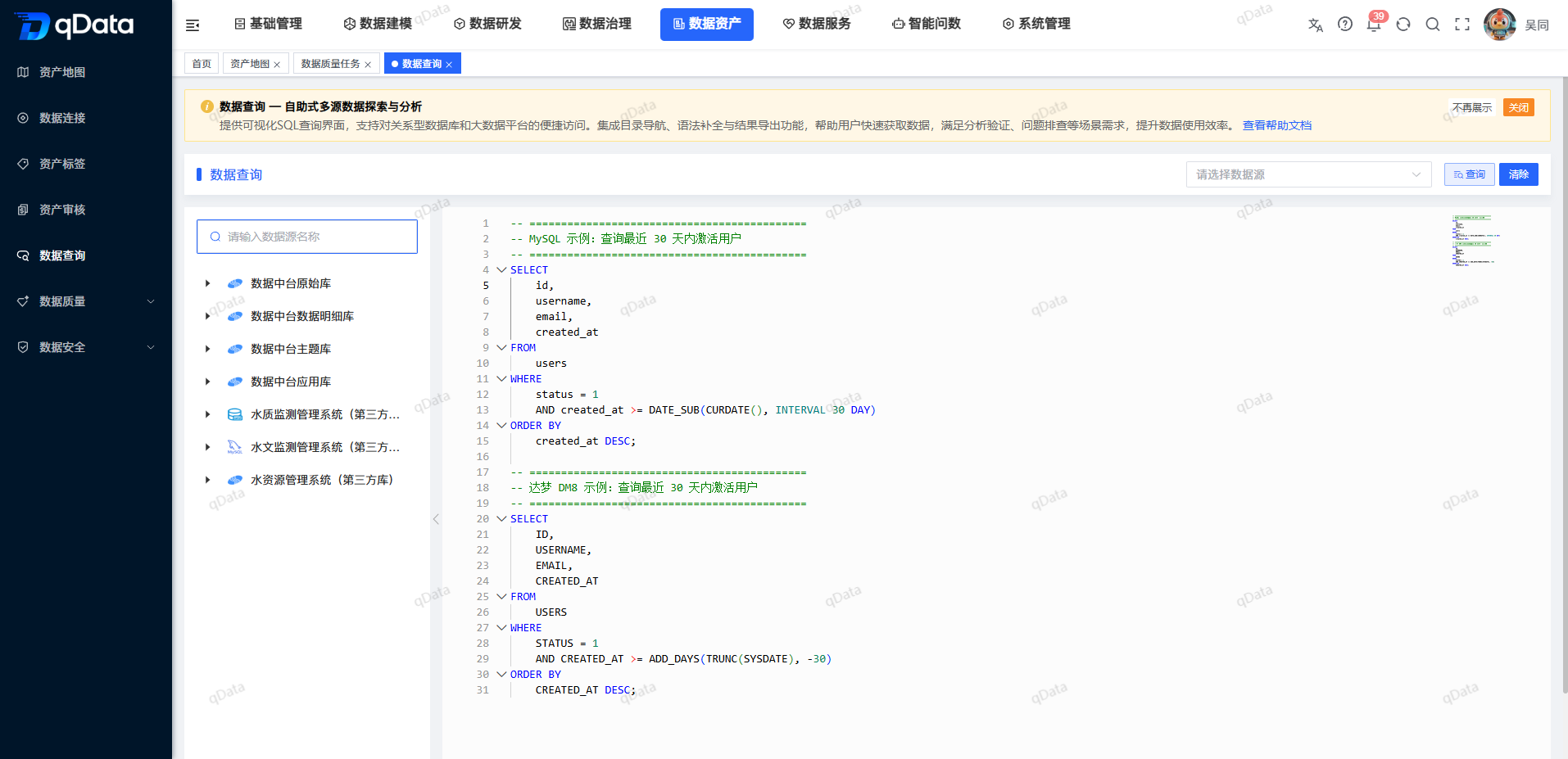
| Region | Main content | Instructions for use |
|---|---|---|
| Data source tree | Data sources, tables, fields | Used to locate query objects. |
| SQL editing area | SELECT query statement | Used to write, adjust and verify SQL. |
| Operation area | Query, clear, etc. buttons | Used to execute queries or clear the editor content. |
| Result pop-up window | Query result table, paging, export, close | Used to view and export query results. |
Recommended operating procedures
Typical query: Enter [Data Query] -> Locate the current data source -> Expand the target table and fields -> Generate or edit SQL -> Click [Query] -> View the result table.
Switch data source: Select another data source -> View the table under the data source -> Reconfirm the SQL -> Click [Query] actively.
View more results: Open the query result pop-up window -> View the total number of entries and paging area -> Use paging or the [Export] entrance as needed.
Functional operation instructions
Browse data sources, tables, and fields
- Enter the [Data Query] page.
- View the data source tree on the left.
- To locate the data source by name, enter the data source name in the search box.
- Expand the target data source node.
- Expand the target table node.
- View the fields contained in the table.
When browsing data sources, you should first confirm whether the current data source is the target of this query. Tables with the same name may exist in different data sources. You need to check the data source name and table name again before executing the query.
Select a table or field to generate SQL
- Expand the target data source and table.
- Select the table or field to query.
- View the SELECT statement generated by the page in the SQL editor.
- Check whether the SELECT field and FROM object correspond to the current selection.
- If adjustments are needed, modify the SQL in the editor.
Common SQL editing concerns are as follows:
| Check items | Description | Suggestions |
|---|---|---|
| Current Data Source | SQL will be executed on the currently selected data source. | Confirm the data source name before querying. |
| table name | table object after FROM. | Confirm that the table name belongs to the current data source. |
| field name | list of fields in SELECT. | Avoid selecting fields that do not have permission or do not exist. |
| Query conditions | WHERE, LIMIT and other conditions. | It is recommended to limit the result range for large table queries. |
Execute query
Click on the right side of the page to enter the SQL statement, select the data source on the left, and click the [Query] button to query the data.
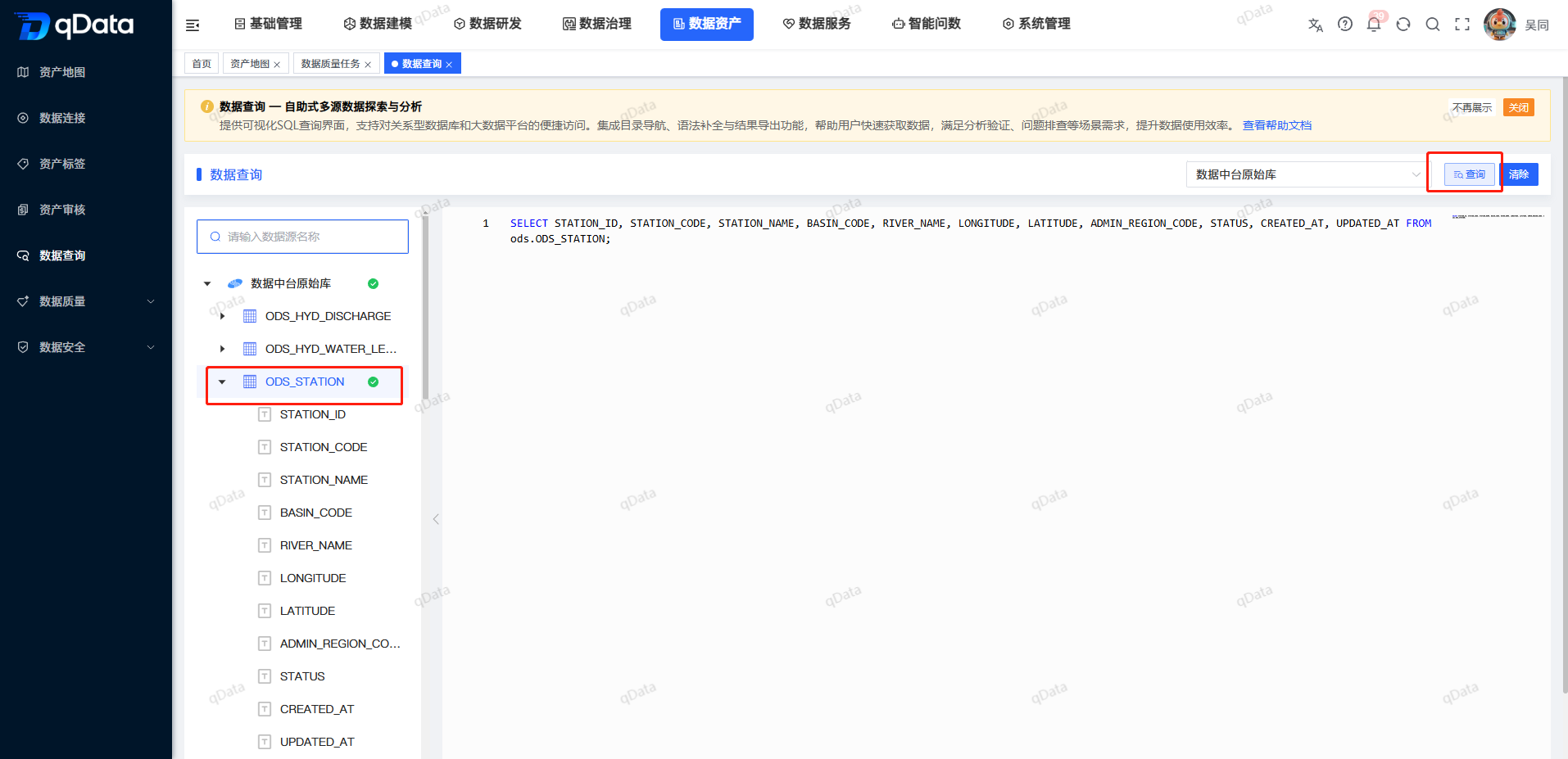
The steps to execute SQL query are as follows:
- Check the current data source at the top of the page.
- Review the SQL to be executed in the editor.
- Click [Query].
- Wait for the query result pop-up window to open.
- View the table header and data rows returned by the current SQL.
Things to note
For tables with large amounts of data, it is recommended to add query conditions or paging restrictions to avoid returning too much data at once and affecting query performance.
View query results
When the query results are returned successfully, a pop-up window will appear on the page to display the query results.
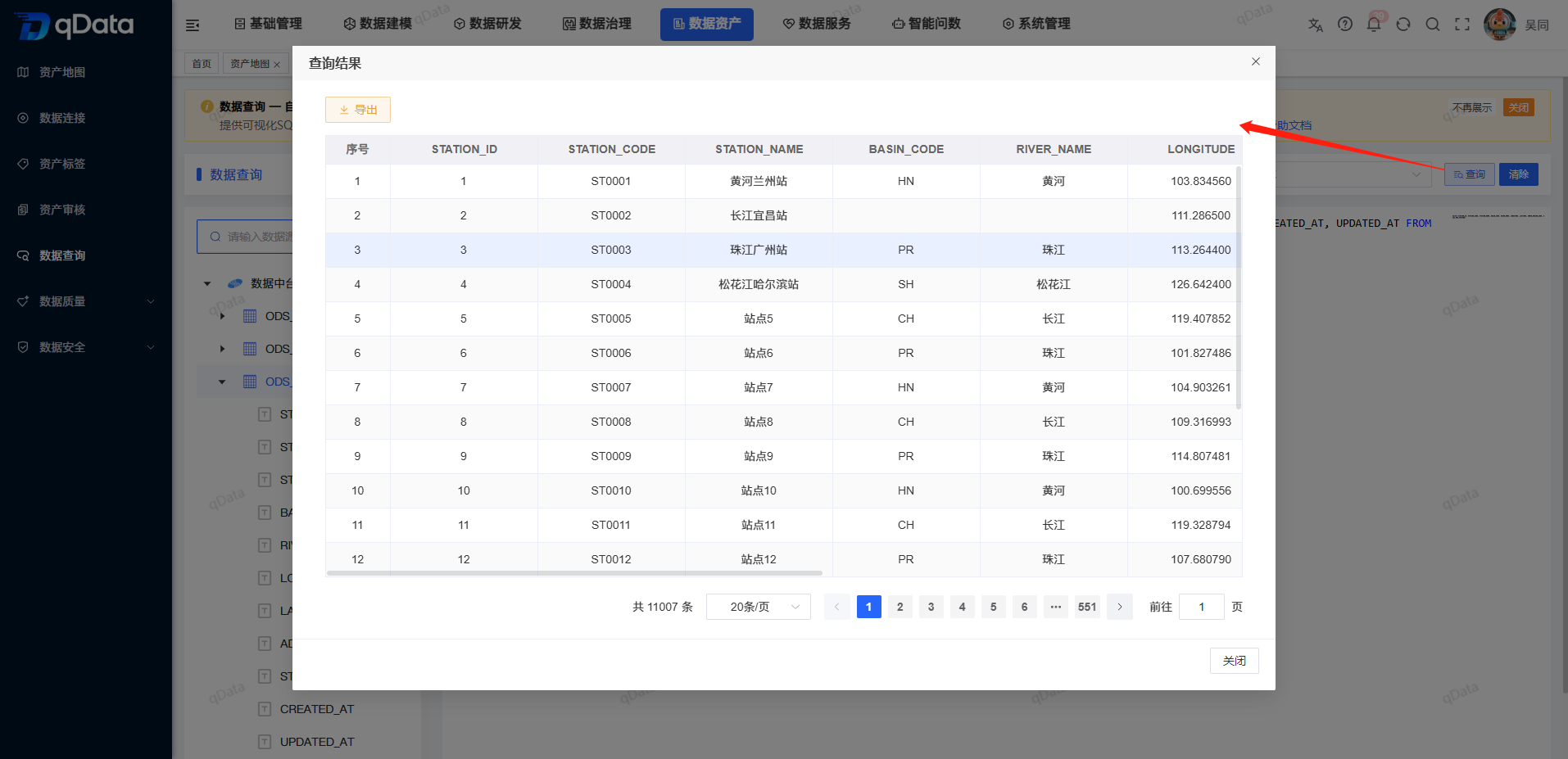
The columns, data rows, and number in the query results will change based on the current SQL. When viewing results, you can use the horizontal scroll bar to browse more fields, and use the paging area to identify the total number of items, the number of items per page, and the current page.
| Result Information | Description | Usage Suggestions |
|---|---|---|
| Header | Fields returned by current SQL. | Check whether the field meets the query target. |
| Data row | The data record returned by the current page. | Check whether the data values are consistent with business expectations. |
| Total number of items | Total number of query results. | Used to evaluate the range of results. |
| Pagination | Number of items and page numbers per page. | to browse more results. |
Export query results
After clicking the [Export] button and clicking the [OK] button, the exported file will be automatically downloaded and can be viewed in the download list of the browser.
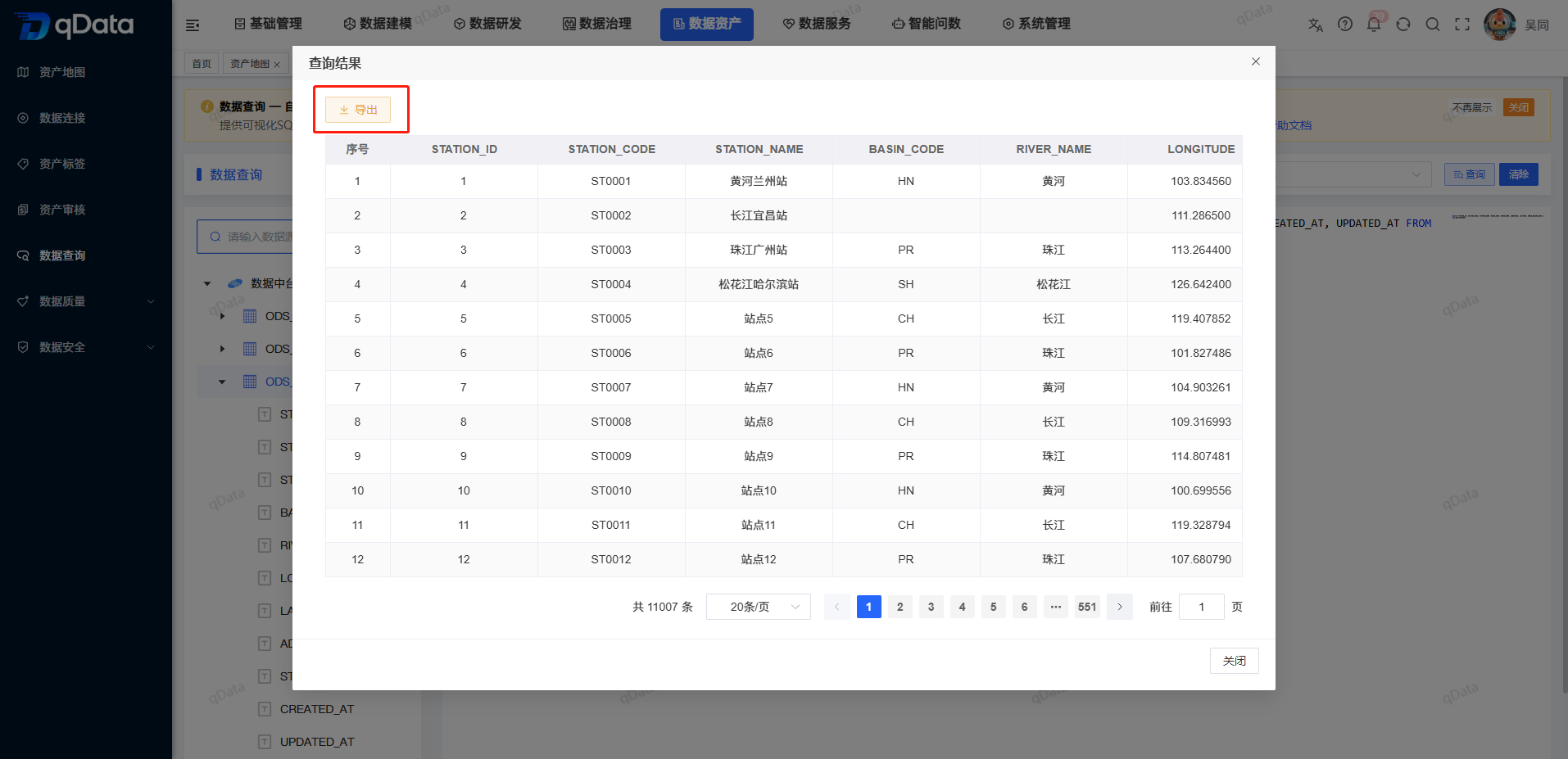
Before exporting, it is recommended to confirm whether the current results are the target query results to avoid exporting erroneous data. If the query results contain sensitive fields, platform permissions and data security requirements should be followed.
Clear SQL
When you need to clear the written SQL statement, click the [Clear] button to clear the SQL statement.
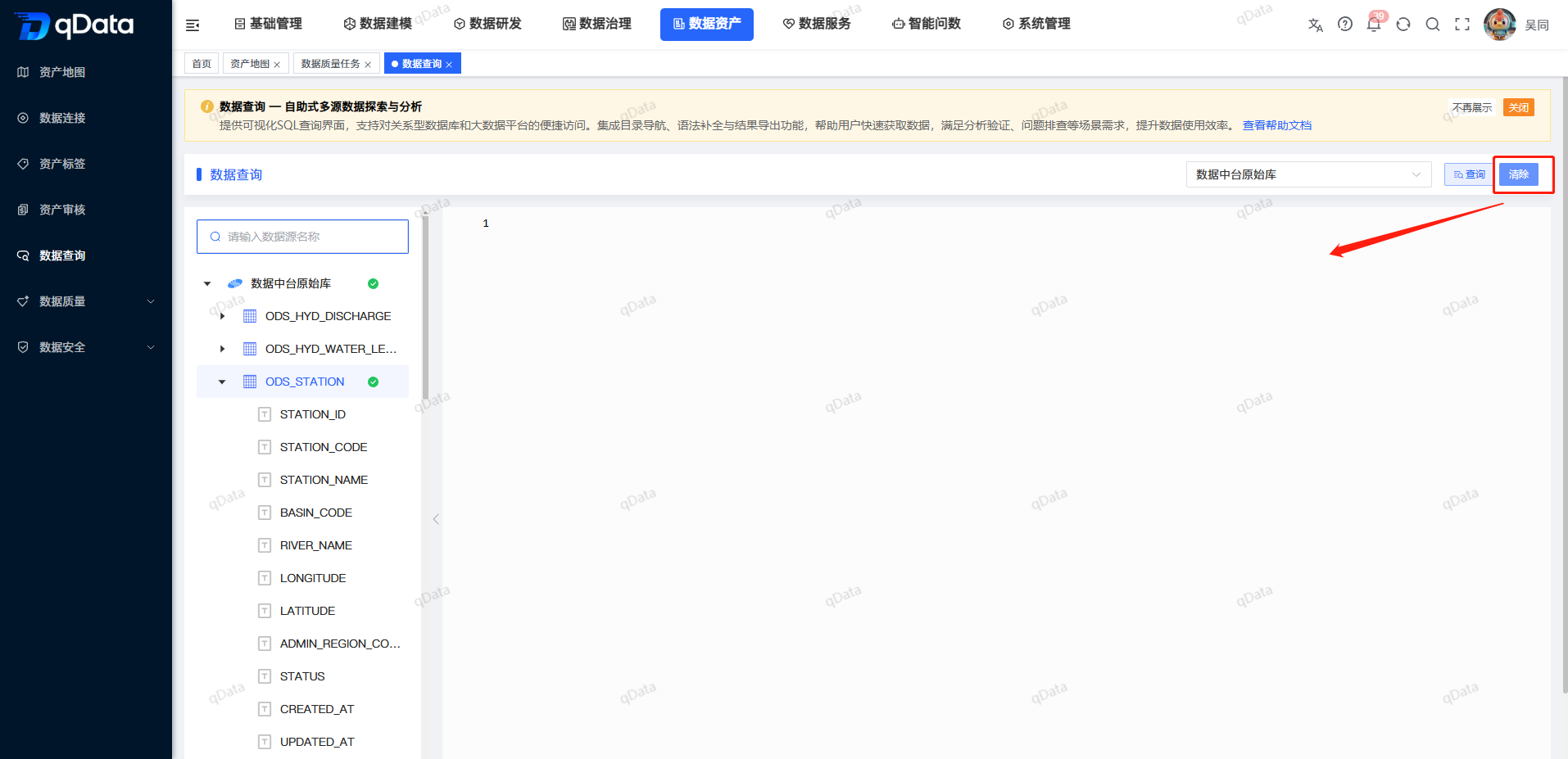
The clear operation only affects the SQL content in the current editor and does not delete the data source, table structure or historical data. After clearing, you can reselect table fields from the data source tree on the left to generate SQL, or enter new query statements manually.
FAQ
Will the query be executed immediately after selecting a table or field?
Won't. The selection operation will only generate or update SQL in the editor. You need to check the current data source and SQL before actively clicking [Query].Why can I still see the original SQL after switching data sources?
Switching data sources does not automatically execute SQL and editor content may remain visible. Please recheck the current data source, table name and fields before execution.Why are the query results empty?
It may be that the query conditions are too narrow, the target table has no data, the current account does not have permissions, or the data source connection is abnormal. It is recommended to relax the conditions and confirm the data source connectivity first.What should I pay attention to before exporting?
It is necessary to confirm the current query results, field ranges and data permissions to avoid exporting non-target data or sensitive data.Will clearing SQL affect data?
Won't. Clearing only clears the editor contents and does not modify or delete any data.
Summarize
Data query strings the data source tree, SQL editor and result pop-up window into a main query line. During operation, focus on checking the current data source, query object, SQL and returned results. After switching the data source, you should recheck the query context before actively executing the query.