
Cleaning rules
Feature overview
Functional positioning
Cleaning rulesare used to centralize the presentation of standardized data processing logic within the platform. The user can understand the rule name, processing instructions, classification and applicable scenarios from the rule category and list, to provide reference for the subsequent selection of appropriate data processing methods.
Simple to understand: Here is a directory of cleaning rules to quickly understand “what are the processing rules of the platform, what problems each rule solves” and not to create, modify, delete, configure, or enforce rules here.
View suggestions
It is recommended to follow the sequence of the https://qiantong.tech confirmation rule category -> navigation rule name and description -> check using the scenario -> identification details portal . When selecting a rule, do not only look at the name, but also check the category, description and use scenario.
Main features
- Category display: The cleaning rules are organized according to six top-level categories on the left.
- Rule summary browsing: The list displays the rule name, description, category, usage scenarios and creation information in a centralized manner.
- Paging information display: The bottom of the page displays the total number of rules, the number of items per page, and the page number structure.
- Read-only directory location: The page is used to browse existing rules and does not provide entry for adding, modifying, deleting, parameter configuration, task binding or rule execution.
Scope
Suitable for users who need to understand the cleaning rule directory and the purpose of the rules. This page only displays the query area control, category tree, rule list, paging information and [Details] entry; the rule details, maintenance, binding and execution are not within the scope of this page.
Preliminary steps
Preconditions
- Logged in to the qData platform.
- You have entered the [Basic Management] module.
- The cleaning rule directory and category information are displayed normally.
Navigation path
Basic Management > Cleaning Rules
Functional operation instructions
View cleaning rule categories
After entering [Cleaning Rules], the category search box and cleaning rule category tree are displayed on the left side of the page, and the query area controls such as rule name and description are displayed on the right side, as well as the rule list and paging information.
- Enter the [Cleaning Rules] page.
- Check the root node of "Cleaning Rule Category" on the left.
- Check the six top-level categories in order: accuracy correction, integrity repair, consistency correction, uniqueness maintenance, validity processing and timeliness adjustment.
- Compare the "Cleaning Rule Category" column in the list on the right to identify the specific attribution of each rule.
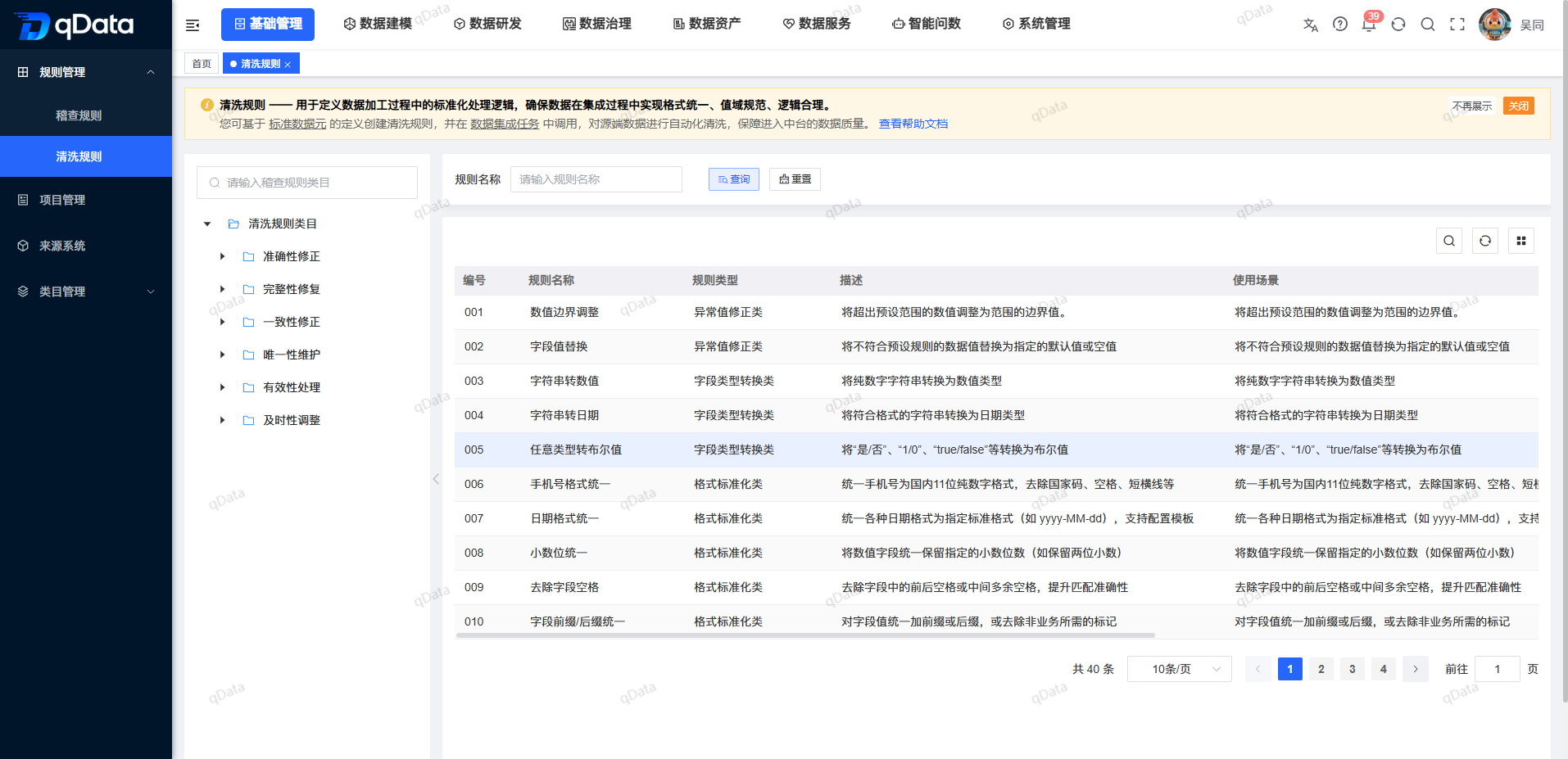
The six top-level categories are as follows:
| Top-level categories | Directory positioning |
|---|---|
| Accuracy correction | Classification accuracy correction related rules. |
| Integrity Repair | Classify rules related to integrity repair. |
| Consistency correction | Classification consistency correction related rules. |
| Uniqueness maintenance | Rules related to classification uniqueness maintenance. |
| Validity processing | Rules related to classification validity processing. |
| Timeliness adjustment | Classification of rules related to timeliness adjustment. |
FAQ
**What are the current top-level cleaning rule categories?**The current page of
displays six top-level categories: accuracy correction, integrity repair, consistency correction, uniqueness maintenance, validity processing and timeliness adjustment.Can I configure, bind or execute cleaning rules on this page?
cannot. This page is used to view the existing rule directory and does not provide rule parameter configuration, task binding or rule execution entry.What should you focus on when choosing cleaning rules?
recommends checking the rule name, category, description and usage scenarios at the same time to avoid judging the purpose based on the rule name alone.
Summarize
The cleaning rules page is a read-only directory of data processing rules. When using it, focus on checking whether the target category is correct, whether the rule name matches, whether the description conforms to the processing logic, and whether the usage scenario is applicable to . Rule maintenance, detailed configuration, task binding and execution need to be completed in other corresponding functions.