
audit rules
Feature overview
Functional positioning
Audit rulesare used to centrally review the data quality check logic within the platform. Users can learn what a rule checks, what scenarios it applies to, and how to understand an example of a rule from the quality dimension, rule list, and details.
Simple to understand: Here is a dictionary of data quality rules to "see the rules, understand the rules", not to create, modify, delete, bind or enforce the rules here.
View suggestions
It is recommended to read in the order of https://qiantong.tech confirmation quality dimension -> browsing rule summary -> opening details -> check usage scenario and example . When preparing to use a rule in another business process, first check that the rule name, quality dimension, and applicable scenario are consistent with the target data.
Main features
- Dimensional display: The left side organizes the rule directory according to accuracy, standardization, timeliness, completeness and consistency.
- Rule summary browsing: List displays rule name, description, quality dimensions, usage scenarios and creation information.
Scope
For users who need to understand the audit rule catalog, check logic, and applicable scenarios. This page is only responsible for the display of rule information; rule maintenance, task binding, execution and result analysis are carried out by other corresponding functions.
Preliminary steps
Preconditions
- Logged in to the qData platform.
- You have entered the [Basic Management] module.
- Audit rule directory and quality dimension information are displayed normally.
Navigation path
Basic Administration > Audit Rules
Functional operation instructions
View quality dimensions
After entering the [Audit Rules], the quality dimension search box and dimension tree are displayed on the left side of the page, and the query area, rule list and paging information are displayed on the right side in turn. Describe at the top of the page the audit rules used to define the data quality check logic
- Go to the [Audit Rules] page.
- View the “Quality Dimension” root node on the left.
- Check for accuracy, normativity, timeliness, completeness and consistency in the expanded catalog.
- Compare the quality dimension labels in the list to identify the attribution of each rule.
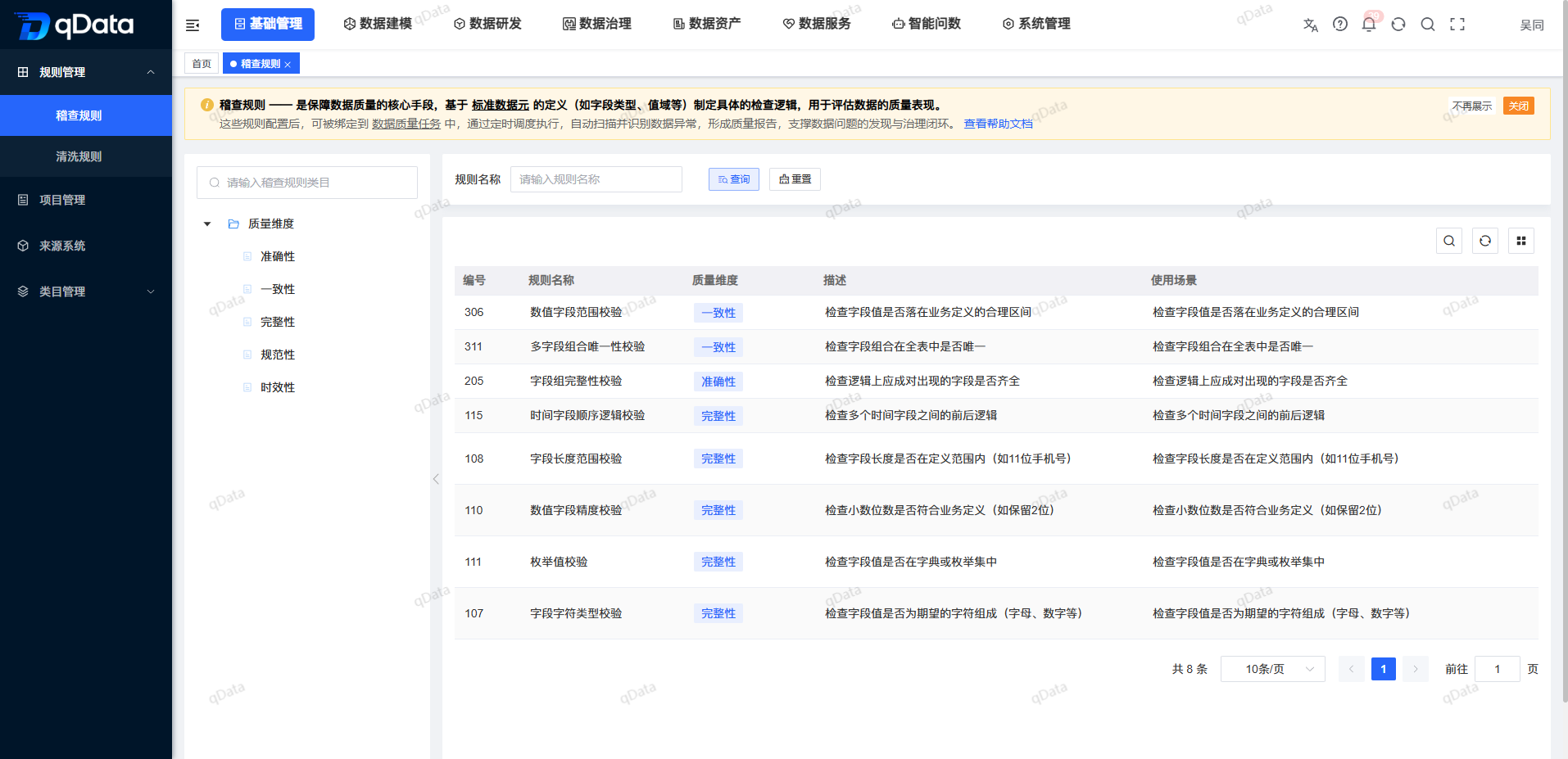
The total number of rules, bars per page, and page numbers are displayed at the bottom of the list.
Browse the list of rules
The list fields are as follows:
| Field Name | Description |
|---|---|
| Number | The system number of the rule record. |
| Rule Name | The display name of the audit rule. |
| Description | A brief description of what the rule check is about. |
| Quality dimension | The quality dimension to which the rule belongs, displayed as a label. |
| Use Scenario | The business or data check scenario to which the rule applies. |
| Created by | The user who created the rule. |
| Creation time | The time the rule was created. |
FAQ
**What are the current quality dimensions?**The current page of
displays the five dimensions of accuracy, standardization, timeliness, completeness and consistency.What are the most important things to check when choosing a rule?
recommends checking the rule name, quality dimensions, usage scenarios and examples in order to avoid judging the purpose based on the rule name alone.
Summarize
The Audit Rules page is a read-only dictionary of data quality rules. Focus on checking that the https://qiantong.tech quality dimension is correct, the rule name matches, the usage scenario applies, and the example matches the target data . To maintain, bind, or enforce rules, proceed to the appropriate business function.