
project management
Feature overview
Functional positioning
Project management is used to maintain the base archive of the Data Development workspace. The project organizes data development content such as data connections, data assets, tasks and jobs according to business lines or teams, and forms isolated work scopes.
Simple to understand: The project corresponds to the “workspace boundary” in data development. Users will only see the Data Development content under the configured items; users without configured items will not be able to see the Data Development module content.
Usage suggestions
It is recommended to query and locate the details according to __ PH->_0 __ -> Add or modify the order -> of deletion of after -> confirming the citation by -> checking the linkage status of the person in charge. After selecting the person in charge, focus on checking the contact information of the automatic backfill.
Main features
- R&D Isolation: The project is only used to isolate Data Development module content.
- Basic File: Unified maintenance of project name, person in charge, contact information, status, description and remarks.
- Responsible person linkage: Contact information is automatically backfilled by the person in charge, cannot be edited directly, and is updated synchronously with changes in the person in charge.
Scope
This page only maintains the project base file, does not provide an entrance for members or role configuration, and does not explain the technical implementation of project resource binding, project switching or isolation. Project isolation applies only to Data Development modules and is not equivalent to platform-level tenant or business space switching.
Data research and development scope
Users without configured items will not be able to see the Data Development content. Before maintaining the project, please confirm the ownership and person in charge of the project to avoid affecting the target user's identification of the Data Development workspace.
Preliminary steps
Preconditions
- You have logged in to the qData platform and can access the [Basic Management] module.
- Identified Data Development projects that need to be established or maintained.
- If new or modified, the project name, owner, status and project description have been prepared.
- If it needs to be deleted, it has been checked whether the project is still referenced by the relevant business.
Navigation path
Basic management > Project management
Page overview
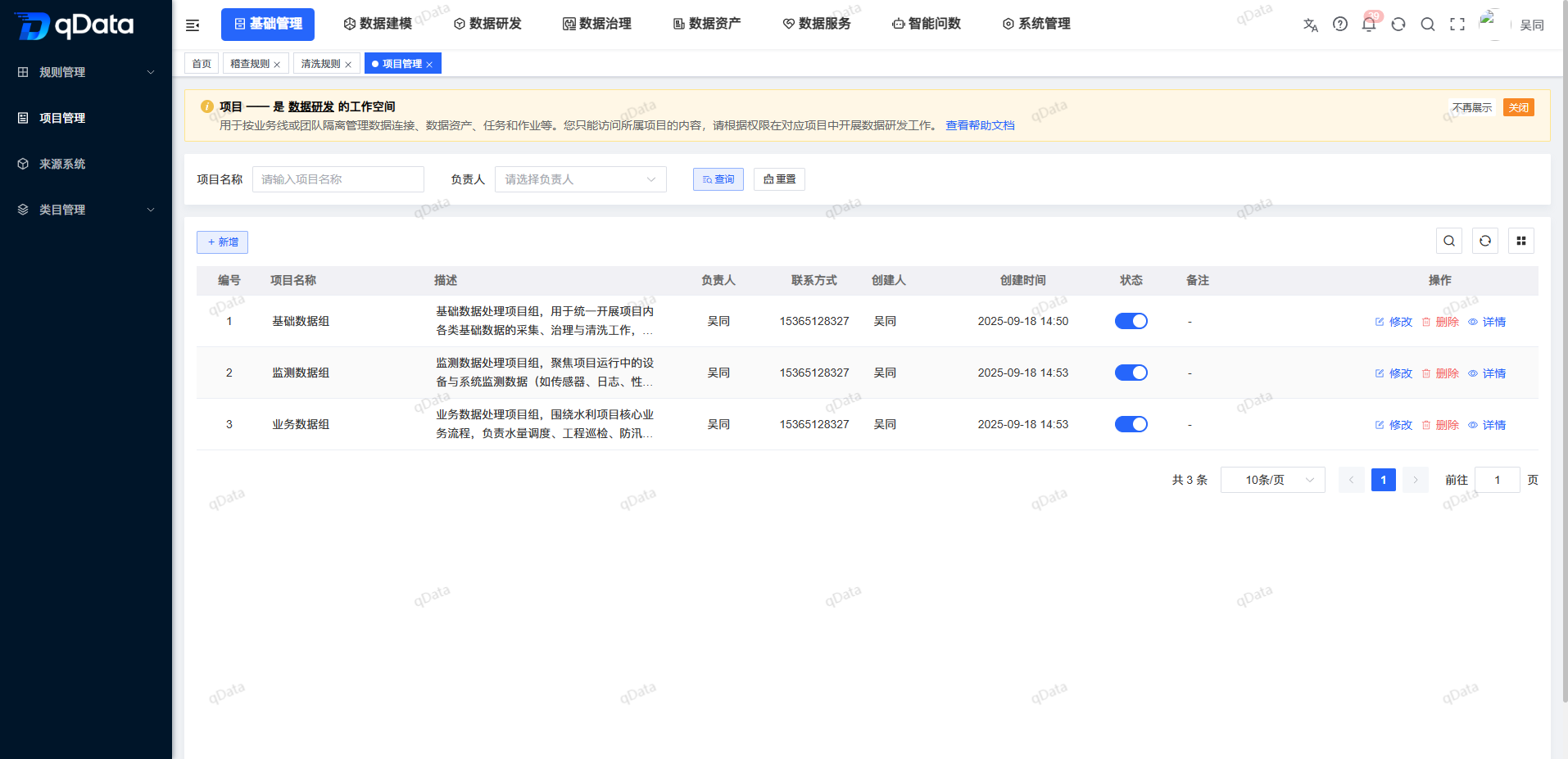
After entering [Project Management], the top of the page indicates that the project is a workspace for Data Development, which is used to isolate and manage data connections, data assets, tasks and jobs by business line or team.
Provide "project name", "person in charge", "status", [query] and [reset] in the query area; [new] is provided at the top of the list. The list displays the number, project name, description, owner, contact information, status, creator, creation time, and action portal.
Recommended operating procedures
Locate the project: Enter the project name or select the person in charge -> Click [Inquiry] to start the query and -> check the target project.
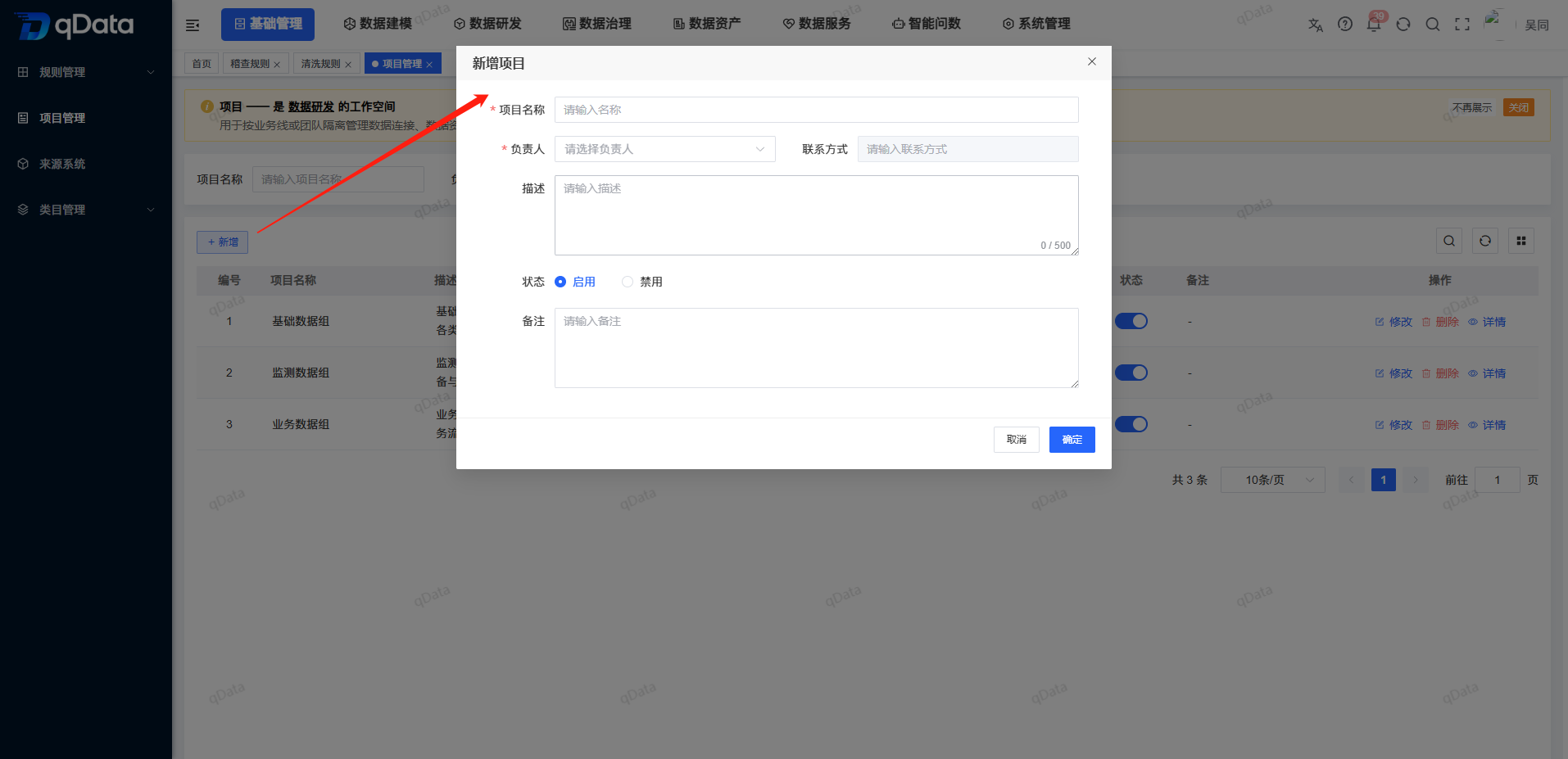
New item: Click [New] -> Fill in the project name -> Select the person in charge to -> review the contact information of the automatic backfill -> Set the status and description -> Click [OK] to initiate the submission.
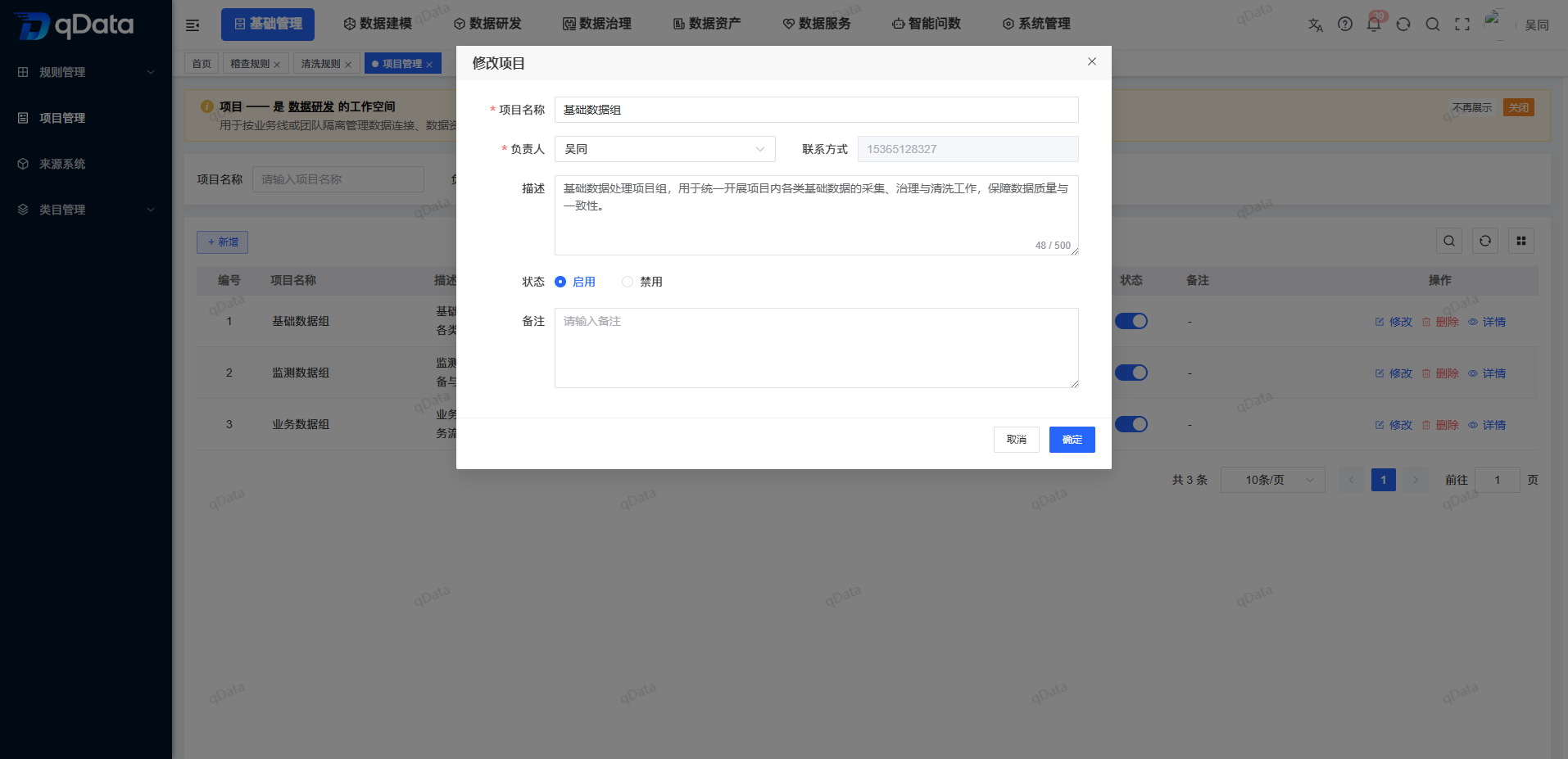
Adjustment items: Click the target line [Modify] to -> check the current field Adjust the owner, status, or description as needed -> -> Click [OK] to initiate the submission.
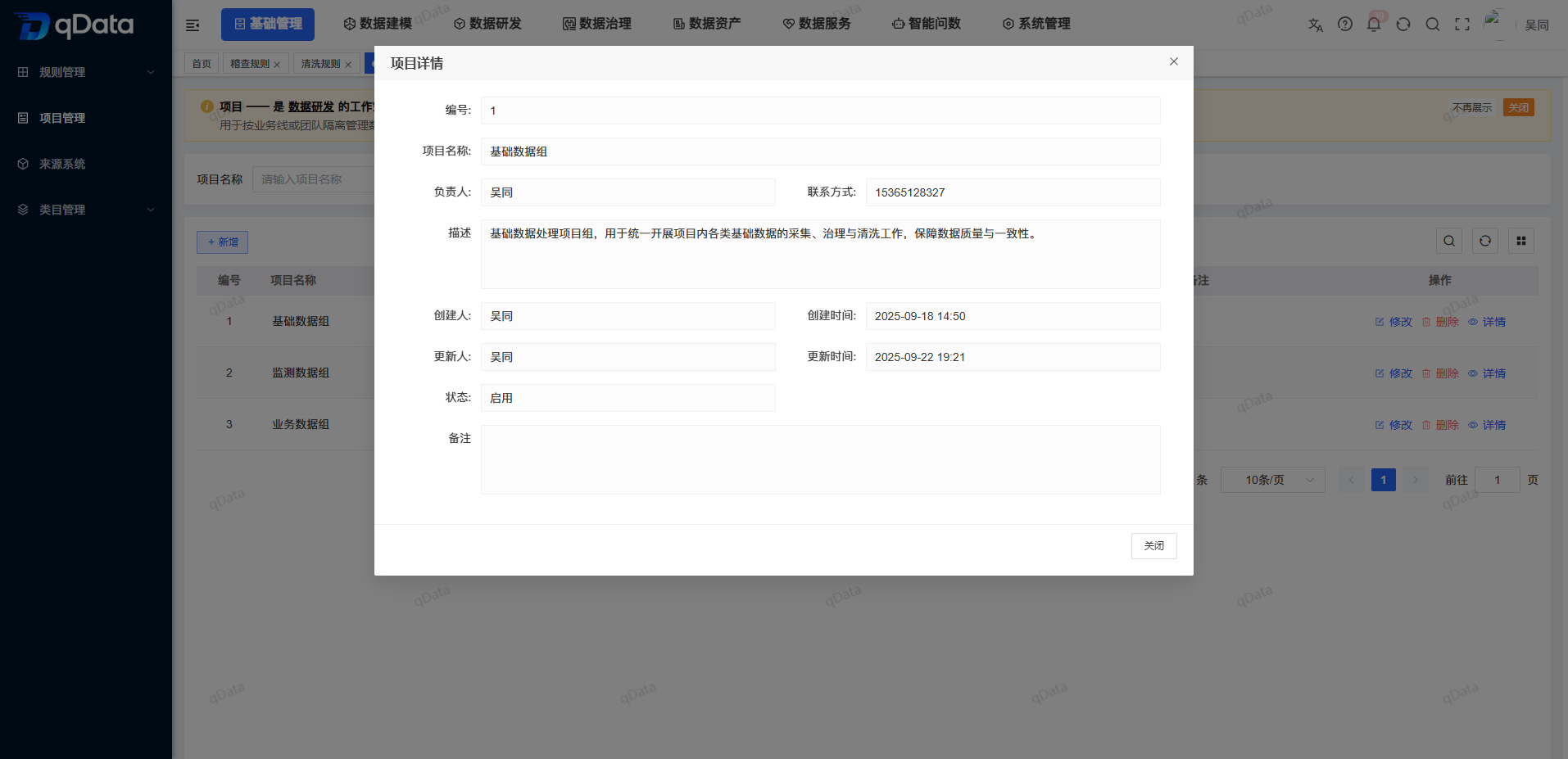
Check and clean up: Use [Details] to check the full file -> status After adjusting, check the actual switch Check the relevant business citations before -> deleting.
Functional operation instructions
Query items
- In Project Name, enter the name of the project to be located.
- Select “Responsible” as needed.
- Select “Status” as needed.
- Click [Query] to initiate the query.
- To reset the conditions, click [Reset].
The page provides the above query conditions, but the specific matching method of the project name is not fixed. After querying, please refer to the actual return results of the page.
View project list
The main fields in the list are as follows:
| Field | Description |
|---|---|
| Number | Project record identification. |
| Project Name | The display name of the Data Development workspace. |
| Description | Description of the purpose and scope of the project. |
| Owner | The person responsible for the current project. |
| Contact details | Contact details of the person in charge. |
| Status | Displays the current status of the item with a switch. |
| Created by, Created on | Creation information for the project. |
| Operation | Provide [modification] [deletion] [details]. |
Add New Project
- Click Add above the list.
- Fill in the project name in the "New Project" pop-up window.
- Select the person in charge.
- Check the contact details of the automatic backfill of the system.
- Set the status, description, and notes as needed.
- Click [OK] to initiate the submission, or click [Cancel] to exit.
Key fields
| Field Name | Description | Required or not |
|---|---|---|
| Project Name | The display name of the Data Development workspace. | Yes |
| Owner | The person responsible for the project, set by selecting the control. | Yes |
| Contact details | Automatic backfilling according to the person in charge, not editable directly; updated synchronously when the person in charge changes. | No |
| Status | Select [Enabled] or [Disabled]; the new screen defaults to [Enabled]. | No |
| Description | Fill in the purpose and scope of the project, up to 500 characters. | No |
| Remarks | Fill in supplementary information, up to 500 characters. | No |
Revise items
- Click [Modify] on the target project line.
- Check the project name, person in charge, contact information, status, description and notes of the pop-up backfill.
- If you need to change the person in charge, select a new person in charge.
- Check if the contact information is updated synchronously.
- Adjust the status, description, or notes as needed.
- Click [OK] to initiate the submission, or click [Cancel] to exit.
View project details
- Click [Details] on the target project line.
- View the project number, project name, owner, contact information, and status.
- Review the description and notes.
- See who created it, when it was created, who updated it, and when it was updated.
- Click [Close] to return to the list.
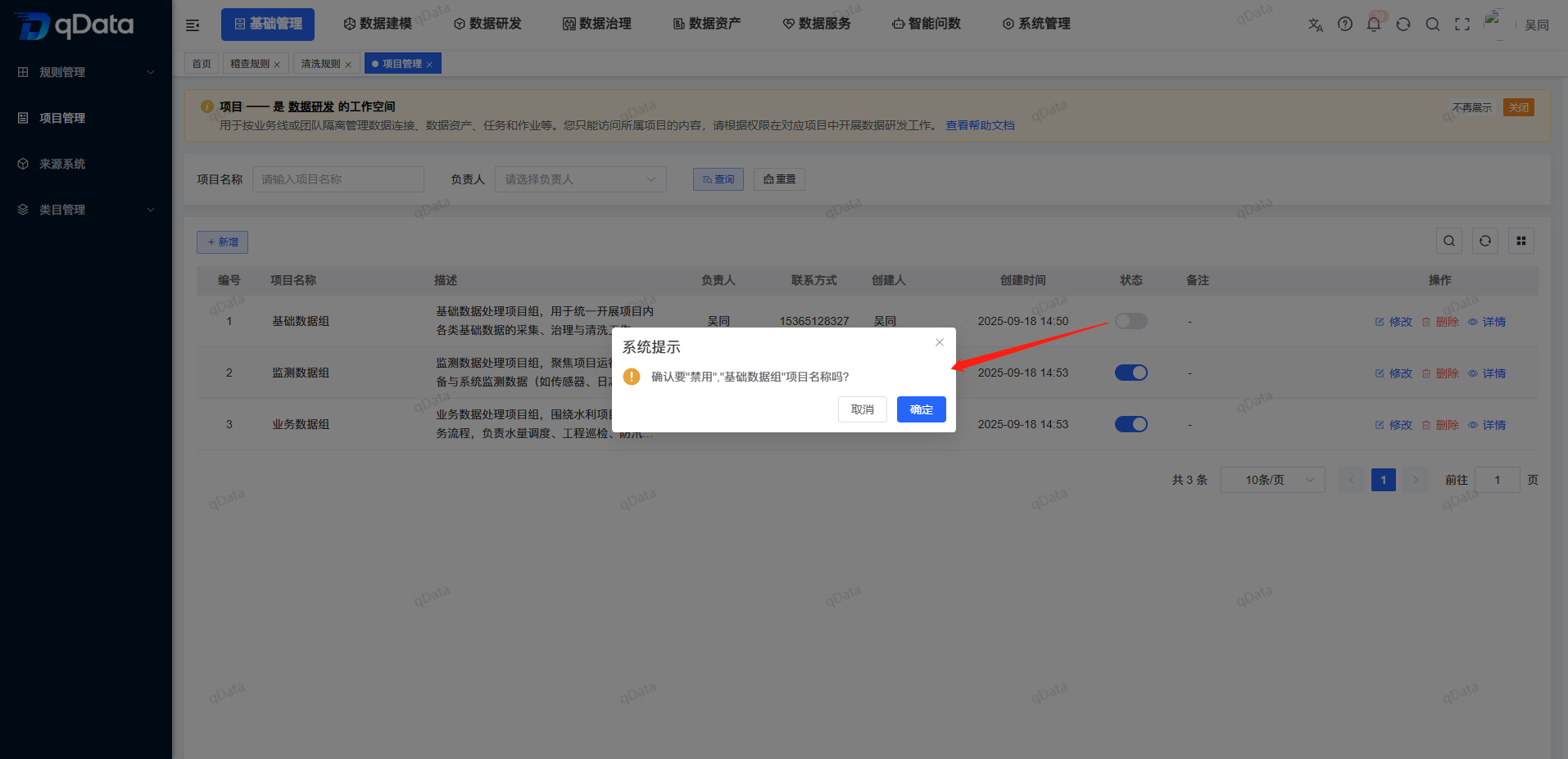
Set project status
The list status column uses the switch, and the [Enable] [Disable] option is used for new and modified pop-ups.
- Enable: The item can be displayed and selected in other reference locations or pages.
- Disabled: The item no longer appears in the visible, selectable scope of other references or pages.
- Data Retention: Disabling will not delete or modify projects and existing historical data, nor will it cascade changes to other objects.
If you need to adjust the status, you can use the status switch on the target row to initiate the operation, and the actual feedback on the page will prevail.
Delete item
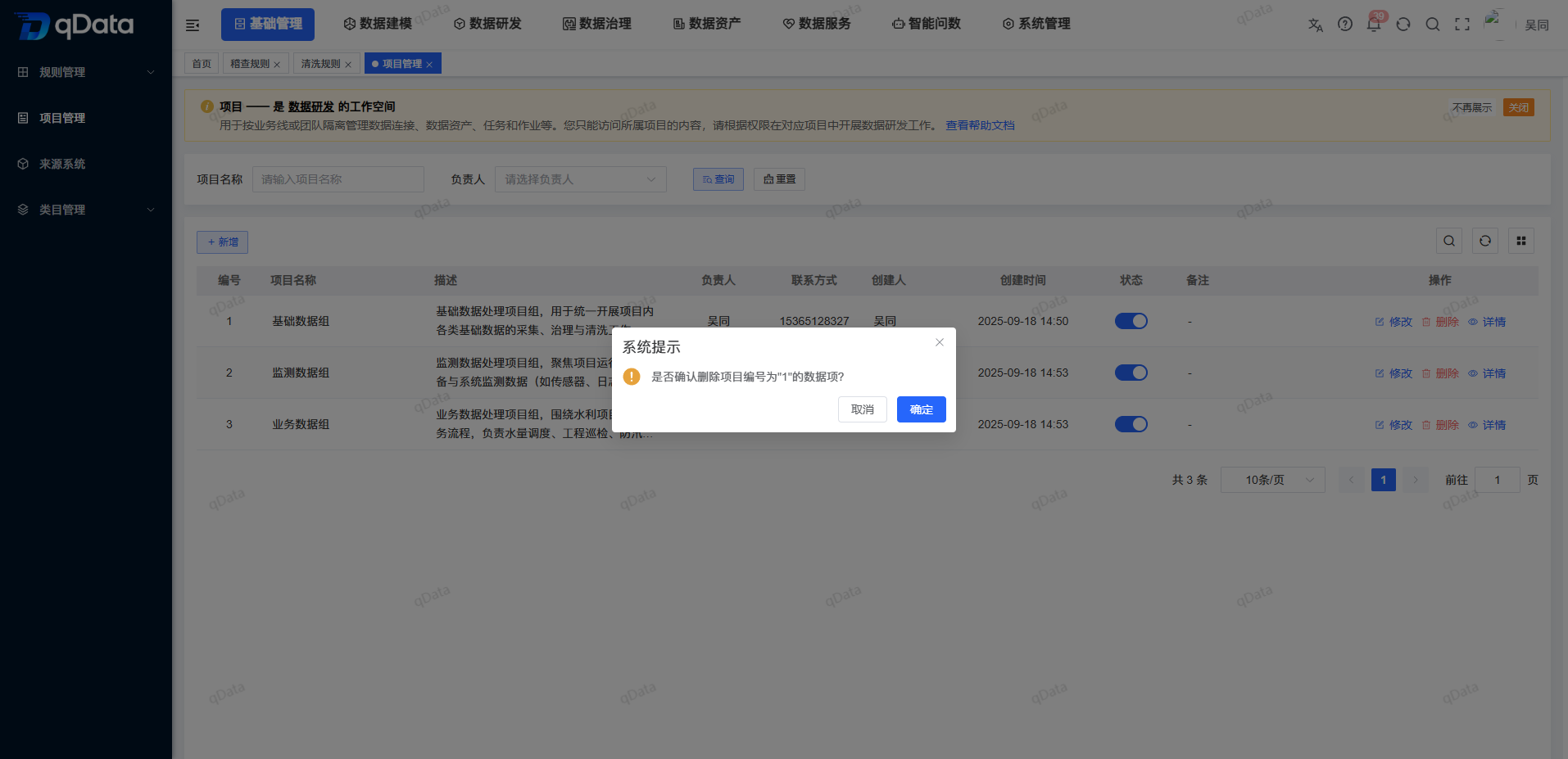
- Locate the target item in the list.
- Check if the project is still referenced by the relevant business.
- Click [Delete] on the target row.
- Check the processing object and refer to the actual feedback on the page.
When the project has relevant business references, the deletion will not be implemented, and the original project records will continue to be retained.
Understand project isolation scope
- The project only isolates the content of the data research and development module, not the platform-level tenants or business space.
- Users who have not configured a project cannot see data research and development content.
- The current page only maintains the basic project files and does not provide member or role configuration.
- How to bind data connections, data assets, tasks and jobs to projects is not done on this page.
FAQ
**What content will the project isolate?**The
project only isolates the data development module content and is used to organize data development content such as data connections, data assets, tasks and jobs.Can users who have not configured projects see the data research and development content?
cannot. Users who have not configured a project cannot see the content of the data research and development module.Where to configure project members and roles?
The current project management page does not have a member or role configuration entry. This page only maintains the basic project files.
Summarize
The key to project management is to simultaneously check the https://qiantong.tech Data Development isolation scope, responsible contact linkage, status, and business reference . Confirm the person in charge and contact information when adding or modifying, check the complete file when viewing the details, pay attention to the visibility of other locations when disabling, and check whether the item is still used by the relevant business before deleting.